
Tech
Top 10 AI Image Generators for Anime & Illustration Art


Introduction
Here’s the thing nobody tells you about AI image generators: most of them are terrible at anime.
You’ll type in “anime girl with silver hair, cel-shaded, dynamic pose” expecting something that looks like it belongs in a manga, and get back a blurry semi-realistic face with weird eyes and hair that fades into the background. I’ve been through this cycle enough times to have opinions.
Illustration is its own kind of hard for these tools. Clean lines matter. Flat color matters. Cel shading is a specific technique, not a filter you slap on. And if you’re doing anything with a recurring character — comics, VTuber assets, a series of prints — you need the same face across ten images, not ten cousins who kind of look alike.
So I put ten tools through the same set of prompts. Character portraits, backgrounds, some weird little creatures, a couple of manga panels. Here’s what came out, and which ones I’d actually use.
How We Test
Five things I paid attention to:
- Style range. Can it handle anime, manga, chibi, semi-realistic, and Western illustration — or is it a one-trick pony?
- Linework and color. Clean edges, saturated color, proper cel shading. Or blurry lines and muddy palettes.
- Character consistency. Same character, different scenes. Does the face hold?
- Illustration-specific tools. Character generators, aging filters, style presets. Anything actually designed for illustration work.
- Free-tier usability. How much you can genuinely try before hitting the paywall.
Everything below is about illustration output. How these tools handle photos is a whole different conversation.
Comparison Table
| Platform | Anime Strength | Free Tier | Dedicated Tools | Paid From |
| Chat Image | Strong | 3 trial credits | Aging filter, more | $14.9/mo annual |
| Nano Banana Bingo | Strong | Trial credits | South Park character creator, more | $9.9/mo annual |
| Picsart | Moderate | Limited free | Editor + AI | $5/mo |
| Manus | Moderate | Trial credits | Agent workflows | Custom |
| getimg.ai | Strong | 100 free/mo | Anime models | $12/mo |
| Higgsfield | Moderate | Limited free | Character tools | $9/mo |
| MiriCanvas | Moderate | Free templates | Design suite | $16.9/mo |
| DeeVid | Moderate | Trial access | Video + image | $10/mo |
| Imagine.art | Strong | Daily credits | Anime models | $8/mo |
| NightCafe | Strong | Daily credits | Community + models | $5.99/mo |
Website List
1. Chat Image
What Is Chat Image
Chat Image is GPT Image 2 wrapped in a chat window. That sounds like a small thing. It’s not.
Normally when you want to tweak an AI-generated character — change the outfit, redo the background, adjust an expression — you’re rewriting the whole prompt and hoping for the best. In Chat Image, you just reply. “Make her hair red.” “Add a school uniform.” Done. For anime work, where you’re iterating constantly, this changes the pace.
The site also has a handful of dedicated tools, including an aging filter, a Family crest maker, and face swap. The aging filter is the one I keep coming back to. Try asking any generator to show the same character as a kid, a teen, and an adult — the face drifts every time. You end up with three different people. The aging filter locks it.
Features
- Chat interface — no re-prompting for edits
- Aging filter, Family crest maker, face swap, and other ready-made tools
- Multilingual text rendering (helpful for manga speech bubbles)
- Natural-language edits on generated images
- Up to 2K output, ten aspect ratios
Pricing
- Explore (Free): $0, 3 trial credits, watermarked
- Create: 19.9/momonthlyor19.9/momonthly**or14.9/mo annual, 300 credits
- Scale: 39.9/momonthlyor39.9/momonthly**or29.9/mo annual, 650 credits
- Operate: 299.9/momonthlyor299.9/momonthly**or199.9/mo annual, 5,000 credits
A 1K medium-quality image costs 3 credits.
Pros & Cons
- ✅ Chat iteration is genuinely faster than re-prompting
- ✅ Aging filter handles a job most tools blow
- ✅ Text rendering works for manga panels
- ❌ 3 free credits isn’t enough to really evaluate
- ❌ Free outputs come watermarked
Best For
Character artists who iterate. If you generate, tweak, generate again, this shaves a real amount of time off the loop.
2. Nano Banana Bingo
What Is Nano Banana Bingo
Nano Banana Bingo runs on the Nano Banana model family. The reason to care, for illustration: character consistency actually works. Upload a reference, and the character comes out recognizable across generations. Not “similar.” Recognizable. Which is the one thing you need for comics, character series, or anything with a returning cast.
The template tools are worth mentioning too. There’s a South Park character maker, a coat of arms generator, a Christmas image generator. The South Park one is a good example of what these tools solve — a highly specific style that’s a nightmare to nail with pure text prompts. Bake it into a template and you’re done in one shot.
Features
- Three model tiers (Lite, Standard, Pro)
- South Park character creator, coat of arms generator, Christmas image generator, and more
- Character consistency from one reference
- Multi-image fusion
- Conversational editing
- Up to 4K on the Pro model
Pricing
- Starter: 9.9/moannualor9.9/moannualor14.9/mo monthly, 800 credits
- Pro: 24.9/moannualor24.9/moannualor39.9/mo monthly, 1,600 credits
- Max: 59.9/moannualor59.9/moannualor99.9/mo monthly, 4,000 credits
- Ultra: 249.9/moannualor249.9/moannualor299.9/mo monthly, 10,000 credits
Credits: 2 for 1K, 4 for 2K, 8 for 4K. One-time packs don’t expire.
Pros & Cons
- ✅ Character consistency actually holds
- ✅ South Park creator nails a style prompts can’t
- ✅ 4K on Pro is enough for print
- ✅ Non-expiring credit packs suit sporadic use
- ❌ Commercial rights start at Pro
- ❌ Free access is trial-only
Best For
Comic work, character series, anything where the same face needs to show up in twenty different scenes and look like the same person.
3. Picsart
What Is Picsart
Picsart does a bit of everything — photos, video, AI generation, the works. On anime prompts, the generator is fine. Not great, fine. What earns Picsart a spot on this list isn’t the AI. It’s the editor.
Once you’ve got an AI-generated illustration, you almost always want to clean it up. Fix a hand. Adjust the color balance. Add a texture. Doing that in most dedicated generators means exporting and switching apps. Picsart lets you do it in place.
Features
- AI generator with style presets
- Full photo editor for post-generation work
- Sticker maker, background remover
- Templates for social and print
- Web and mobile apps
Pricing
- Free: Limited AI generations, watermarked
- Plus: $5/mo, more credits and pro features
- Pro: $7/mo, higher limits and premium content
Pros & Cons
- ✅ Editor is actually useful for finishing
- ✅ Cheap paid entry
- ✅ Mobile app is solid
- ❌ Not built for anime specifically
- ❌ Free tier is thin
Best For
Illustrators who want generation plus editing in the same tool. Weaker as a pure anime generator.
4. Manus
What Is Manus
Manus is an AI agent. Image generation is one thing it does among many others. For illustration, that means you can hand it something bigger than a single-image prompt — say, a full character sheet with front, side, back, plus a few expression variants — and let it work through the whole brief step by step.
It’s slower than a direct generator when you just want one image. But when the brief has ten pieces, that changes.
Features
- Agent workflow for multi-step projects
- Access to several underlying models
- Task decomposition
- Asset management
Pricing
Custom, based on usage and workspace setup.
Pros & Cons
- ✅ Handles multi-asset briefs in a single session
- ✅ Structure is baked in
- ❌ Slow for one-offs
- ❌ Pricing isn’t posted
Best For
Illustrators with structured projects — character sheets, prop libraries, environment sets — where the workflow matters more than raw speed.
5. getimg.ai
What Is getimg.ai
If you’re serious about anime and you want models, getimg.ai is where you go. Multiple fine-tuned anime checkpoints. LoRA support, which means you can train your own style or your own character. Inpainting, outpainting, the whole toolkit.
Fair warning: the interface is technical. You’ll see terms like samplers and CFG scale and probably want to google them. But the payoff is real. This is where the ceiling is highest.
Features
- Multiple anime and illustration fine-tuned models
- LoRA support
- Inpainting and outpainting
- 100 free generations per month
- API access on higher tiers
Pricing
- Free: 100 generations/month
- Basic: $12/mo, 3,000 generations
- Starter: $24/mo, 8,000 generations
- Hobby: $48/mo, 20,000 generations
- Pro: $99/mo, 50,000 generations
Pros & Cons
- ✅ Deepest anime model selection here
- ✅ LoRA for custom characters and styles
- ✅ 100 free generations a month is a real allowance
- ❌ Interface has a learning curve
- ❌ Best models sit behind paid tiers
Best For
Anime illustrators who want to go deep. Not the friendliest way in, but you can push further here than anywhere else on this list.
6. Higgsfield
What Is Higgsfield
Higgsfield started as a video tool and added images later. The reason to look at it for illustration is the character consistency toolkit — build a character, then keep them looking like themselves across scenes. That’s what storyboards and comics need, and Higgsfield has actually thought about it.
The anime range is thinner than what the specialists offer. But the consistency flow is well built, and if you’re heading toward animation eventually, having both in one platform is convenient.
Features
- Character consistency tools
- Motion and video alongside image generation
- Illustrated style presets
- Storyboard-oriented flow
Pricing
- Free: Limited access
- Basic: $9/mo, monthly credits
- Pro: $29/mo, higher limits and priority
- Ultimate: $99/mo, top credit allocation
Pros & Cons
- ✅ Character consistency works
- ✅ Storyboard flow suits comics and manga
- ✅ Video in the same tool
- ❌ Anime range is thinner than specialists
- ❌ Free tier is stingy
Best For
Comic and manga creators who need character continuity — and might animate later.
7. MiriCanvas
What Is MiriCanvas
MiriCanvas is Canva-shaped. Templates, layouts, fonts, an AI generator tucked inside. For illustration, the AI is not the reason to use it. The reason is what’s built around the AI — layouts, character templates, social sizes, everything you’d need to turn a raw illustration into something finished.
Features
- Template-driven design suite
- Built-in AI image generation
- Large font and asset library
- Social and print layouts
- Free tier with template access
Pricing
- Free: Templates plus limited AI
- Pro: $16.9/mo, full library plus AI credits
Pros & Cons
- ✅ Templates make finished pieces quick
- ✅ Good for illustrated social content
- ✅ Free tier has real design tools
- ❌ AI is a secondary feature
- ❌ Anime range is limited
Best For
Creators making illustrated social posts, marketing graphics, layouts. Less about generation, more about what happens after.
8. DeeVid
What Is DeeVid
DeeVid is video-first with image tools attached. For illustration, the interesting part is what happens after you generate — you can animate the character in the same tool, without exporting anywhere. Useful if you’re going between static art and short clips.
As a pure image generator, it’s average. But if animation is in your plan, that math changes.
Features
- Image and video in one platform
- Character-to-video flow
- Multiple aspect ratios
- Free-tier trial access
Pricing
- Free: Trial access
- Basic: $10/mo, monthly credits
- Pro: Higher tiers with more credits
Pros & Cons
- ✅ Image-to-video for animated illustration
- ✅ One tool covers still and motion
- ❌ Images aren’t the priority
- ❌ Anime range is moderate
Best For
Illustrators making animated shorts, VTuber content, or anything where the art needs to move eventually.
9. Imagine.art
What Is Imagine.art
Imagine.art is a good middle-ground pick. Strong anime models, interface that doesn’t require reading a manual, daily free credits so you can actually learn the tool over time instead of burning through a trial in an afternoon.
The style library covers the usual anime looks — cel-shaded, semi-realistic, chibi, manga. Nothing exotic, but the basics are solid.
Features
- Multiple anime and illustration models
- Daily free credits
- Style library across common anime looks
- Inpainting and editing
- Web and mobile
Pricing
- Free: Daily credits, watermarked
- Standard: $8/mo, monthly credits
- Premium: $20/mo, higher limits and premium models
- Ultimate: $40/mo, top allocation
Pros & Cons
- ✅ Strong anime models
- ✅ Daily credits let you actually practice
- ✅ Interface doesn’t get in the way
- ❌ Watermarks on free output
- ❌ Best models sit on paid tiers
Best For
Anime illustrators who want a specialist tool without the technical setup of getimg.ai.
10. NightCafe
What Is NightCafe
NightCafe is built around a community, and honestly, that’s the feature. You can browse other artists’ work with their prompts and settings visible — which turns out to be the fastest way to learn stylized illustration. Copy someone’s approach, tweak it, learn from what changes.
Daily free credits keep the free tier viable long-term, not just for trying it out.
Features
- Multiple models including anime-tuned ones
- Active community with prompt sharing
- Daily free credits
- Style transfer and evolution tools
- Prints and merch integrations
Pricing
- Free: Daily credits
- AI Beginner: $5.99/mo, monthly credits
- AI Hobbyist: $9.99/mo, more credits
- AI Enthusiast: $19.99/mo, higher limits
- AI Artist: $49.99/mo, top allocation
Pros & Cons
- ✅ Community is the fastest way to learn prompts
- ✅ Daily free credits work long-term
- ✅ Broad model access
- ❌ Community can eat your time
- ❌ Best models on paid tiers
Best For
Illustrators who learn by studying other people’s work. The community isn’t a nice-to-have here — it’s the main thing.
Key Takeaways
- Specialists outperform generalists on anime. getimg.ai, Imagine.art, and NightCafe beat the broader tools on pure anime prompts. Start with a specialist if anime is your main thing.
- Character consistency is the hardest problem, and only a few tools solve it. Nano Banana Bingo, Higgsfield, and getimg.ai with LoRA all handle it. Prioritize this over almost everything else if your work involves recurring characters.
- Dedicated tools do things prompts can’t. Chat Image’s aging filter, Nano Banana Bingo’s South Park character creator — specific looks and transformations that generic prompts fumble.
- Daily credits beat one-time trials. Imagine.art, NightCafe, and getimg.ai give ongoing free access. Trial-only tools cap how much you can learn before paying.
- Editor tools matter for finishing. Picsart and MiriCanvas earn their place when raw output needs cleanup or layout. Pure generators leave the last step to you.
Conclusion
The right tool depends on the work. getimg.ai has the deepest models. Imagine.art and NightCafe are the easier ways in. Chat Image and Nano Banana Bingo solve specific things — aging, stylized characters, consistency — that prompts alone struggle with. Picsart and MiriCanvas make sense when finishing matters as much as generating.
Pick two or three that match what you’re actually making and run the same brief through each. That’ll teach you more in an hour than reading comparison tables all day.



Introduction
The AI music generation has become surprisingly affordable. What used to cost hundreds of dollars in a recording studio can now be produced for less than a nickel per track — if you know which platform to subscribe to. But published "monthly prices" rarely tell the full story. A $9.99 plan with 1,000 credits isn't necessarily cheaper than a $23.99 plan with 10,000 credits, and annual discounts can cut per-song costs by up to 50%.
This article breaks down the ten most cost-effective AI music generator platforms available right now, calculated by the real metric that matters: actual dollar cost per song generated. We factored in subscription price, monthly credit allowance, credit-to-song conversion ratios, and annual billing discounts to produce an apples-to-apples comparison.
How We Test
To rank these platforms fairly on cost, we used the following criteria:
Per-song cost (annual billing): The effective price of generating one song under the cheapest subscription tier available, calculated using the platform's own credit conversion rules.
- Per-song cost (monthly billing): The same metric calculated at standard monthly pricing, without annual discounts.
- Entry tier affordability: The lowest paid plan's monthly cost and what you actually get for it.
- Free tier value: How much you can generate before paying anything.
- Hidden costs or caps: Download limits, concurrent generation restrictions, and credit rollover rules that affect real usage economics.
- All numbers below come directly from each platform's public pricing pages.
TL;DR Comparison Table
| Rank | Platform | Cheapest Per-Song Cost | Entry Paid Plan | Free Tier |
|---|---|---|---|---|
| 1 | musicgenerator | ~$0.034/song (Ultra annual) | $7.9/mo (Starter annual) | 6 signup credits |
| 2 | AIMusic | $0.012/song (Ultra) | $7.99/mo (Pro annual) | 15 credits/day |
| 3 | Brev AI | $0.012/song (Ultra) | $7.99/mo (Pro annual) | 25 credits/day |
| 4 | Nafy AI | $0.021/song (Pro annual) | $12.42/mo (Basic annual) | 1.5 gens/day |
| 5 | Udio | ~$0.017/gen (Pro annual) | $8/mo (Standard annual) | 10 credits/day |
| 6 | AI Song Maker | $0.035/song (Pro annual) | $10.49/mo (Basic annual) | 20 credits/day |
| 7 | aisong.io | $0.025/song (Premium) | $9.99/mo (Starter) | 10 credits/day |
| 8 | MelodyCraft | $0.043/song (Premium annual) | $16/mo (Pro annual) | 3-day trial |
| 9 | Tad AI | ~$0.06/gen (Pro) | $7.99/mo (Standard) | 21 signup credits |
| 10 | Mubert | $0.0625/gen (Ultra annual) | $11.67/mo (Creator annual) | 25 gens/month |
The 10 Cheapest AI Music Generators
1. musicgenerator
musicgenerator is a one-stop online AI audio platform that balances generation cost with feature breadth. It operates on a tiered model system where the Luna model (m-luna) is accessible across all plans, while the Terra (m-terra) and Sol (m-sol) models unlock at the Plus tier and above for more expressive output. Beyond music generation, the platform bundles supporting tools like a song lyrics generator, AI Song Cover Generator, stem splitter, and vocal remover — all accessible from the same credit pool, so you don't pay separately for auxiliary features.
- Features:
- Three AI audio models: m-luna (all plans), m-terra and m-sol (Plus+)
- AI music generation from text prompts or custom lyrics
- Stem splitting, vocal remover, and song extension tools
- Reference audio upload (Plus and Ultra plans)
- Licensed audio upload for remixing (Ultra only)
- AI Singing Voice Generator and Personas (Ultra only)
- Pricing (annual billing):
- Free: $0 — 6 one-time signup credits, online preview only
- Starter: $7.9/mo — 180 credits/mo, MP3 download
- Plus: $16.9/mo — 500 credits/mo, lossless WAV, commercial license
- Ultra: $69.9/mo — 2,300 credits/mo, all models, licensed audio upload
Each generation consumes 3 credits, meaning the effective per-generation cost ranges from about $0.13 on Starter to $0.09 on Ultra when billed annually.
- Pros:
- Credit packs never expire (available Starter Pack through Enterprise Pack)
- Clear model tiering makes it easy to pick a plan that matches your needs
- Supports reference audio upload for style guidance on Plus+
- Cons:
- Free tier credits are one-time, not recurring
- No download on the free plan — only in-browser preview
Best for: Creators who want flexible scaling — start with Starter for MP3 output, upgrade to Plus when commercial licensing and lossless WAV become necessary.
2. AIMusic (aimusic.so)
AIMusic runs a credit-based system with per-feature pricing that rewards users who do more than just generate full songs — vocal removal, music extension, and cover art each have their own credit costs.
- Features:
- V6 mini (all plans), V6 (Pro+), V6 Wild (Ultra only)
- Song generation: 5 credits/song
- Music extension: 3 credits per operation
- Vocal removal: 5 credits per file
- AI cover image: 2 credits; sound effects: 1 credit
- Lyrics generator and lyrics video (free on Pro+)
- Pricing:
- Free: 15 credits/day refresh (3 songs/day), 7-day storage, no download
- Pro (annual): $7.99/mo, 1,500 credits/mo, 4 concurrent tasks
- Ultra (annual): $23.99/mo, 10,000 credits/mo, 10 concurrent tasks, lossless WAV
- Per-song cost:
- Pro: $0.0266/song (about 2.66 cents)
- Ultra: $0.0120/song (about 1.20 cents)
- Pros:
- Among the cheapest per-song cost on Ultra tier
- Granular credit pricing means you only pay for what you use
- Commercial license certificate available on annual plans
- Cons:
- Free tier generations are public and limited to 7-day storage
- Credits don't roll over month-to-month
- Best for: High-volume creators who need predictable bulk pricing and only generate full songs occasionally.
3. Brev AI (brev.ai)
Brev AI uses nearly identical pricing to AIMusic, with V6 mini, V6, and V6 Wild models tiered across plans. The per-feature credit system is also the same: 5 credits per song, 3 for extensions, 2 for cover art, 1 for sound effects.
- Features:
- Three-tier model system (V6 mini / V6 / V6 Wild)
- Song generation from text or custom lyrics
- Vocal remover and stem splitter (Ultra adds stem splitting for self-generated tracks)
- Music extension and AI cover image generation
- Lyrics video (free on paid plans)
- Unlimited cloud storage on Pro and Ultra
- Pricing:
- Free: 25 credits/day (5 songs/day), 7-day storage, public generations
- Pro (annual): $7.99/mo, 1,500 credits/mo
- Ultra (annual): $23.99/mo, 10,000 credits/mo, lossless WAV
- Per-song cost:
- Pro: $0.0266/song
- Ultra: $0.0120/song
- Pros:
- Generous free tier at 25 daily credits
- Ultra tier matches AIMusic for lowest per-song cost
- PDF commercial license certificate on annual subscriptions
- Cons:
- Monthly credits don't roll over
- Pro tier limited to MP3 — WAV is Ultra-exclusive
- Best for: Hobbyists exploring AI music who want 5 free songs daily before committing to a paid plan.
4. Nafy AI
Nafy AI prices by "generations" rather than credits, with one generation producing two song variants. This makes its per-song math straightforward: half the per-generation price.
- Features:
- V6, V5.5, and V5 model selection across all tiers
- AI Music Extension and AI Music Editor (segment-level editing)
- AI Song Cover Generator with cross-genre reconstruction
- Vocal remover and custom voice training (Voice Changer)
- AI Singing Video Generator for lip-sync videos
- Lossless WAV and MIDI export on paid plans
- Pricing (annual):
- Free: 1.5 generations/day (3 songs/day), 14-day storage, no commercial use
- Basic: $12.42/mo, 125 gens/mo (250 songs)
- Standard: $24.92/mo, 500 gens/mo (1,000 songs), 4 concurrent
- Pro: $49.92/mo, 1,200 gens/mo (2,400 songs), 8 concurrent
- Per-song cost:
- Basic: $0.0497/song
- Standard: $0.0249/song
- Pro: $0.0208/song
- Pros:
- Pay-as-you-go credits never expire and unlock most Pro features
- MIDI export supported on paid tiers — rare among competitors
- Each generation yields 2 variants for one price
- Cons:
- Higher entry price ($12.42/mo) than AIMusic or Brev AI
- Free tier excludes commercial use and downloads
- Best for: Producers who want MIDI output for further DAW editing and value getting two takes per prompt.
5. Udio
Udio takes a different approach by charging primarily by generation count rather than per song. A single generation produces 2 songs (4 in the free tier's batch), and each full-length (130-second) track consumes credits proportionally.
- Features:
- 32-second clips or full 130-second (2:10) songs
- Remix and Extend existing tracks
- Precise music and lyrics editing
- Style Reference, Blend Styles, and Reduce Styles controls
- Voice Control with library of voices plus custom voice saving
- Audio upload for creative guidance
- Pricing:
- Free: 10 credits/day, 100/mo, 3 full-length songs daily cap
- Standard: 8/moannual(10 monthly), 2,400 credits/mo, 6 parallel
- Pro: 24/moannual(30 monthly), 6,000 credits/mo, 10 parallel
- Credit cost:
- Standard annual: $0.00333/credit
- Pro annual: $0.00400/credit
- Add-on packs: $3/100 credits or $25/1,000 credits
- Pros:
- Lowest per-credit cost in this comparison on Standard annual
- Strong control features like style blending and voice reuse
- Student discounts available on Pro
- Cons:
- Monthly credits don't roll over
- Shorter maximum song length (130 seconds) than many competitors
- Best for: Experimental producers who prioritize style control and voice consistency over long-form output.
6. AI Song Maker (aisongmaker.io)
AI Song Maker operates on a 5-credits-per-song model with one of the most generous credit rollover policies in the industry — unused subscription credits roll to the next month, up to 3× your monthly allocation.
- Features:
- Text/Lyrics to Music with harmony and melody
- AI Song Cover Generator with style reconstruction
- Extend Song and Upload Custom Music (2–8 min uploads on paid)
- Custom Voice Model training (AISinger)
- VibeSeed — uses your song as a mood seed
- AI Music Video Generator (10 sec to 5 min visuals)
- AI Singing Photo Generator for lip-sync videos
- Pricing (annual):
- Free: 20 credits/day (4 songs/day), 30-day storage, non-commercial
- Basic: $10.49/mo, 12,000 credits/year
- Standard: $20.99/mo, 30,000 credits/year, 10 concurrent
- Pro: $41.99/mo, 72,000 credits/year, unlimited concurrent
- Per-song cost:
- Basic: $0.0525/song
- Standard: $0.042/song
- Pro: $0.035/song
- Pros:
- Credits roll over month-to-month (3× cap)
- Unique features like VibeSeed and AISinger voice training
- Downloadable commercial license certificate with unique ID per song
- Cons:
- Credit packs ($6/400 or $100/10,000) cost more per credit than the subscription
- Free tier requires attribution
- Best for: Creators with uneven monthly workloads who need credits to carry forward.
7. aisong.io
aisong.io offers a flat 10-credits-per-generation rate, with each generation producing 2 songs. Commercial licensing is included on every plan — including the free tier.
- Features:
- Text to Song, AI Song Edit, AI Rap generation
- Extend, Cover, and segment replacement
- Stem Splitter and LRC lyrics generator
- Lyrics card maker and AI sound effects
- Free unlimited tools: BPM calculator, audio-to-text, MP3 converter, audio trimmer
- AI music video and lip-sync video generators
- Pricing:
- Free: 10 credits/day (new users get 20/day for first 15 days), 7-day storage
- Starter: $9.99/mo (reg. $14.99), 1,000 credits/mo (~200 songs)
- Standard: $19.99/mo (reg. $29.99), 3,300 credits/mo (~660 songs)
- Premium: $39.99/mo (reg. $59.99), 7,900 credits/mo (~1,580 songs)
- Per-song cost:
- Starter: $0.050/song
- Standard: $0.030/song
- Premium: $0.025/song
- Pros:
- Commercial license included even on free plan
- Free bundled utilities (BPM, converters) consume zero credits
- New-user bonus doubles free credits for 15 days
- Cons:
- Credits reset each billing cycle — no rollover
- Discounted prices listed may be promotional
- Best for: Users who want commercial rights from day one without paying for a subscription.
8. MelodyCraft
MelodyCraft positions itself at a higher price point but compensates with aggressive 50% annual discounts and extensive premium features like API access and white-label options.
- Features:
- Text to Song and Lyrics to Music generation
- AI Lyrics Generator and AI Song Cover Generator
- Vocal Removal Tool and Song Extension (up to 10 min on Pro, unlimited on Premium)
- 5 concurrent generations (Pro) or 10 (Premium)
- API access, white-label options, custom AI model training (Premium only)
- AI photo, video, voice, and story generators included
- Pricing:
- Pro: 32/mo(16/mo annual), 1,000 credits/mo (~200 songs), 3-day trial
- Premium: 52/mo(26/mo annual), 3,000 credits/mo (~600 songs), 7-day trial
- Per-song cost (5 credits/song):
- Pro monthly: $0.160/song | Pro annual: $0.080/song
- Premium monthly: $0.087/song | Premium annual: $0.043/song
- Pros:
- 50% annual discount — largest in this ranking
- 14-day money-back guarantee
- Enterprise-grade features (API, white-label) on Premium
- Cons:
- No perpetual free tier — only trial periods
- Monthly billing is expensive compared to competitors
- Best for: Agencies and businesses who can commit to annual billing and need API or white-label capabilities.
9. Tad AI
Tad AI uses a slider-based credit system that lets Standard and Pro users pick their monthly credit allowance (500–1,500 for Standard, 2,000–4,000 for Pro).
- Features:
- Tad 6.0 AI audio engine with Smart and Custom modes
- AI Music, Rap, Cover, and Phonk generators
- Vocal Remover and Stem Splitter (Standard+)
- AI Music Video Generator
- Reference audio upload — includes pasting TikTok, Instagram, Facebook links
- AI Lyrics enhancement (polish, expand, trim)
- Custom singer voice model training
- Pricing:
- Free: 21 one-time signup credits, standard voice models
- Standard: $7.99/mo, 500–1,500 credits/mo, 3 concurrent
- Pro: $23.99/mo, 2,000–4,000 credits/mo, 6 concurrent
- Per-credit cost:
- Standard: $0.016/credit
- Pro: $0.012/credit
- Pros:
- Unique ability to paste social media audio URLs as references
- Slider-based credit customization
- 20% annual discount available
- Cons:
- Published materials don't specify a fixed per-song credit cost
- No permanent free tier — only one-time signup credits
- Best for: TikTok and Instagram creators who want to generate music inspired by viral social audio.
10. Mubert
Mubert specializes in royalty-free background music for creators, with a hard commercial-use boundary: music generated here cannot be released to Spotify, Apple Music, or registered with Content ID regardless of plan.
- Features:
- Chat2Music AI v2 (paid unlocks full version)
- Text 2 Music, Image 2 Music, MusicGen AI
- Full Track Editor: modify structure, regenerate sections, edit stems, Quick Remix, adjust BPM and key
- Up to 60-minute track generation on Ultra
- Copyright Checker included on all plans
- 30-day Plus/Max trial of Fuse (video) and Cast (podcast) tools on Pro and Ultra
- Pricing (annual):
- Free: $0, 25 generations/mo, 30-min daily cap, watermark + attribution
- Creator: $11.67/mo, 100 gens/mo, 10-min max tracks
- Pro: $32.49/mo, 500 gens/mo, 25-min tracks, unlimited downloads
- Ultra: $62.50/mo, 1,000 gens/mo, 60-min tracks, full agency rights
- Per-generation cost (annual):
- Creator: $0.117/gen
- Pro: $0.065/gen
- Ultra: $0.0625/gen
- Pros:
- Longest track duration available (60 min on Ultra)
- Full Track Editor offers rare structural control
- Bundled Copyright Checker on every plan
- Cons:
- Highest per-generation cost on Ultra in this list
- Streaming platform release prohibited on all plans
- Best for: Video producers and podcasters needing long-form background music with no Spotify-style ambitions.
Key Takeaways
Lowest per-song cost overall: AIMusic Ultra and Brev AI Ultra both land at $0.012/song, making them the mathematical winners for pure volume.
- Best entry-tier value: AIMusic Pro and Brev AI Pro at $7.99/mo annual both hit $0.0266/song — strong budget picks.
- Biggest annual discount: MelodyCraft's 50% off annual pricing cuts Premium from $52 to $26/mo.
- Best free tier: Brev AI's 25 daily credits (5 songs/day) narrowly beats AIMusic's 15 daily credits.
- Longest tracks for the money: Mubert Ultra delivers 60-minute tracks that most competitors can't match at any price.
Credits that don't vanish: AI Song Maker's rollover policy (up to 3× monthly allocation) and Nafy AI's permanent pay-as-you-go packs stand out from rivals that reset monthly.
Conclusion
Per-song cost alone isn't the full picture. A $0.012/song rate means nothing if the platform doesn't support the song length, licensing terms, or editing tools you need. The cheapest platforms in this list — AIMusic and Brev AI — reward high-volume users on their top tiers, while Udio and Nafy AI offer better value for creators who want advanced control features. Mubert costs more per generation but delivers track lengths no competitor matches. Before subscribing, check how each platform handles credit rollover, download formats, and commercial licensing — those three factors often matter more than headline price.

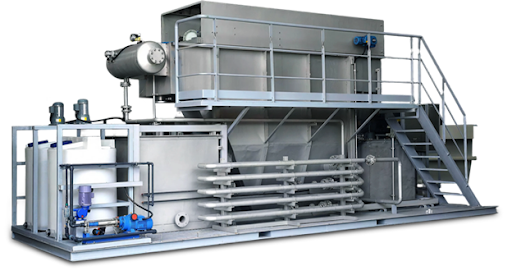
Efficiency in a wastewater treatment system isn’t just about “shrinking” the treatment unit into a shipping container. Efficient system operation occurs when each treatment stage has a well-defined purpose, upstream processes safeguard downstream equipment, controls are responsive to the operating conditions, and the final treatment level is commensurate with the desired effluent quality.
The practical concept of containerized wastewater treatment systems is one of these. Rather than focus on the benefits of the container, the more effective design is to consider the container as an engineered platform to coordinate biological, physical-chemical, membrane, pumping, dosing and control functions.
QILEE uses this method for industrial wastewater, municipal sewage, decentralized treatment and water-reuse projects. The containerized configurations of the wastewater treatment process can include biological treatment, dissolved air flotation (DAF), chemical dosing, membrane bioreactor technology, filtration, nanofiltration (NF), reverse osmosis (RO), and other supporting equipment depending on wastewater characteristics.
This does not mean that there is one standard process for each site. Efficiency is achieved by only using the treatment functions needed by the wastewater.
Why QILEE Containerized Wastewater Treatment Systems Can Operate Efficiently
To make a containerized plant efficient, process design, equipment placement and controls should be considered as an integrated system and not as individual parts of the system.
In wastewater projects, this is important because each phase is dependent on the previous phase. If solids are not removed properly, the fouling of membranes may be greater. Chemical dosing, which is not stable, can have a negative effect on separation performance. Biological loading may be incorrect and impact the quality of water in the downstream environment. For these interactions, it is possible to think about them in advance in an integrated design.
Process Selection Starts With the Wastewater, Not the Equipment
Industrial wastes generate various treatment issues. Food-processing wastewater may contain significant amounts of biodegradable organic matter, while metal finishing wastewater may need specific removal of metals. Oily wastewater requires a different pretreatment from municipal sewage, and high-ammonia wastewater may require a special removal stage.
Therefore, the first step to efficient wastewater management is wastewater characterization. The treatment train may be affected by flow rate, pH, suspended solids, COD, ammonia nitrogen, oil, salt, metals, and the required standard of discharge or reuse.
Below is a helpful chart of the impact of common processes.
| Process | Primary Role | Efficiency Contribution |
| Combining DAF and chemical dosing | Removes suspended solids, oils, flocs or specific contaminants | Reduces the load on downstream processes |
| The water quality treatment process is biological treatment using the AO/A²O process. | Helps remove biodegradable pollutants and treat nutrients | Applies organic and nutrient loads in a biological manner |
| MBR / TMBR | Combined biotechnological treatment and membrane separation | Effective solid/liquid separation in small volume |
| Multimedia filtration | Removes suspended material from water. | Safeguards smaller downstream processes |
| NF | Selective membrane separation | Enhances more complex treatment as required to achieve greater separation |
| RO | Removes dissolved salts and other dissolved contaminants. | Aids in achieving higher levels of re-use or purified-water goals |
Pretreatment Protects the Processes That Follow
Long-term operating efficiency can often be won or lost in pretreatment. Excessive solids, oils or chemically removable contaminants are better managed prior to becoming a downstream burden by membranes and biological systems.
As part of its integrated product range, QILEE offers containerized physical-chemical configurations for combining chemical dosing, coagulation-flocculation, DAF, lamella clarification, neutralization, sedimentation, multimedia filtration, activated carbon filtration or chemical oxidation, depending on the application.
Oily or emulsified wastewater may require separation before biological or membrane treatment and heavy-metal wastewater may require chemical precipitation. The intent is to avoid usage of downstream processes to do work that can be done more effectively in a pretreatment process.
ALT text: QILEE containerized wastewater pretreatment system with chemical dosing, DAF, filtration, piping, and control equipment
MBR Integration Saves Space Without Eliminating Process Control
Membrane bioreactor technology can be useful in applications that demand both biological treatment and good solid-liquid separation in a small area.
An MBR system separates treated water from suspended biomass with the help of membranes while also breaking down biodegradable pollutants in the biological treatment process. This eliminates the need to rely on a traditional secondary clarifier for final separation of biomass.
The efficiency gain is hence not just a finer filtration but functional integration. Compact plant layouts and effluent separation are supported by MBR; however, much like other processes, membrane performance is dependent on suitable upstream conditions, aeration, cleaning, hydraulic loading, and maintenance.
Automated Controls Reduce Unnecessary Manual Intervention
Wastewater is not always steady-state. Normal operating conditions may include changes in flow, pollutant concentrations, tank levels, pressure, and chemical demand.
Integrated controls enable pumps, dosing systems, valves, alarms, and monitoring instruments to be switched on by the same control logic. Intelligent pump valves and smart control functions are available for QILEE’s containerized systems, with an integrated system range that also offers automated dosing systems and packaged control panels.
Automation does not render a wastewater system maintenance-free. There is still work to be done by operators for inspection, alarm response, cleaning, and treatment performance verification. Value is consistency: routine actions can be coordinated automatically, and abnormal conditions are easier to detect.
Compact Layout Can Improve Operation and Maintenance
A crowded container is not an efficient container. There should be sufficient space available to inspect, service the membrane, maintain pumps, calibrate instruments, and replace wear items.
Effective containerization of equipment, therefore, goes beyond the simple objective of maximizing equipment density. This will be affected when pipes are routed, valves can be accessed, drainage and ventilation can be done, the operator can move around, and clearances for services are considered.
Pre-integrating primary equipment also minimizes the number of interfaces that have to be put together on site. Much of the process coordination between the internal team has been completed, though there is remaining work in the following stages: foundations, external piping, and utility connections, and commissioning.
Treatment Depth Should Match the Final Water-Quality Target
One common way to increase energy use and operating expenses is to over-treat the water. The other problem, inadequate treatment, can lead to compliance or reuse problems.
Biological treatment and solid-liquid separation can be justified in a discharge application, and extra filtration, NF, or RO may be justified in a reuse project. If the water is highly dominated by ammonia nitrogen, a targeted deamination process may be necessary instead of the application of additional general filtration processes.
That is why the required effluent quality should be determined early. It helps to decide if advanced membrane treatment is required and avoid the inclusion of the equipment without putting a measurable treatment service.
Conclusion
The most efficient containerized wastewater treatment systems are not simply the most compact. Pretreatment eliminates pollutants, which will complicate subsequent treatment processes; biological processes treat biodegradable components; membranes offer controlled separation when necessary; and automatic controls coordinate normal operation.
QILEE can incorporate these capabilities into a containerized treatment package as dictated by the characteristics of the influent, required treatment capacity, site conditions and final water quality goals for industrial and decentralized projects.
This is how to judge a containerized plant: What is it doing, what is it protecting, and is it needed for the target effluent quality? Once the answers to those questions are obvious, the concept of compact design is no longer a stretch for space but rather a useful method to construct a cohesive treatment system.
The electronics industry continues to evolve rapidly, creating a growing demand for smaller, faster, and more efficient printed circuit boards. As electronic devices become increasingly sophisticated, manufacturers require advanced PCB technologies that support high component density, excellent signal integrity, and reliable performance. High-Density Interconnect (HDI) technology has emerged as an essential solution for meeting these requirements.
Choosing a reliable hdi pcb manufacturer is critical for businesses developing innovative electronic products. FastTurn PCBA offers advanced PCB manufacturing and assembly solutions designed to support complex circuit designs, compact electronic devices, and demanding industrial applications. With a focus on manufacturing precision, quality control, and efficient production processes, FastTurn PCBA helps businesses turn sophisticated circuit designs into functional electronic products.
Understanding HDI PCB Technology
High-Density Interconnect (HDI) printed circuit boards are advanced circuit boards designed to accommodate more electrical connections within a smaller physical area. Unlike conventional PCBs, HDI boards incorporate specialized manufacturing techniques, including microvias, fine lines, smaller spacing, and advanced multilayer structures.
These technologies allow engineers to create compact electronic systems without sacrificing essential functionality or electrical performance.
HDI PCBs commonly feature:
- Microvias: Small drilled holes that connect adjacent PCB layers and enable compact routing.
- Fine-Line Circuitry: Narrow traces and spacing that support high-density component placement.
- Multilayer Construction: Multiple conductive layers that accommodate complex circuit designs.
- Blind and Buried Vias: Specialized connections that improve routing flexibility while conserving board space.
- Advanced Materials: Carefully selected substrates that support electrical reliability and thermal performance.
- High Component Density: Efficient placement of electronic components within limited board dimensions.
These characteristics make HDI technology particularly valuable for modern electronic devices requiring miniaturization and advanced functionality.
Why Choose FastTurn PCBA as Your HDI PCB Manufacturer?
Selecting the right manufacturing partner significantly influences electronic product quality, development efficiency, and long-term reliability. FastTurn PCBA focuses on providing PCB manufacturing and assembly solutions that address the technical requirements of modern electronics.
Advanced PCB Manufacturing Capabilities
HDI PCB manufacturing requires precise production processes and specialized equipment. Hdi pcb manufacturer supports advanced circuit board solutions intended for applications where traditional PCB manufacturing techniques may not provide sufficient routing density.
Manufacturing considerations include fine-line patterning, accurate layer alignment, controlled drilling, and reliable interconnections between conductive layers.
These processes are essential for producing circuit boards that meet demanding electrical and mechanical requirements.
Support for Complex PCB Designs
Modern electronic products often contain powerful processors, communication modules, sensors, and other sophisticated components. Integrating these elements into compact devices requires careful PCB design and manufacturing coordination.
FastTurn PCBA helps customers address challenging PCB requirements through manufacturing-oriented solutions that support complex board structures and dense component layouts.
PCB Manufacturing and Assembly Solutions
Working with a provider that supports both PCB fabrication and assembly can simplify electronic product development.
FastTurn PCBA provides PCB manufacturing and assembly services that help businesses coordinate important production stages.
Potential advantages of integrated manufacturing and assembly include:
- Improved communication between fabrication and assembly teams.
- Reduced coordination requirements across multiple suppliers.
- Better alignment between PCB design and assembly requirements.
- More efficient prototype development.
- Simplified production planning.
- Improved consistency throughout manufacturing workflows.
This integrated approach can be particularly beneficial for businesses developing complex electronic products.
Key Benefits of HDI PCB Technology
HDI printed circuit boards offer several important advantages over conventional PCB structures. These benefits make them suitable for industries where compact designs and advanced electronic performance are essential.
Smaller and Lighter Electronic Devices
One of the most significant advantages of HDI technology is its ability to reduce PCB size while maintaining complex electrical functionality.
Microvias and fine-line routing allow designers to create dense interconnections without requiring excessive board space.
This capability is particularly useful for smartphones, wearable electronics, medical devices, and portable communication equipment.
Improved Signal Integrity
High-speed electronic systems require carefully designed signal paths to minimize interference and maintain stable communication between components.
HDI technology provides additional routing flexibility, allowing engineers to optimize signal paths and reduce unnecessary connection lengths.
When combined with appropriate impedance control and layout practices, these features can improve signal integrity in high-frequency and high-speed applications.
Enhanced Design Flexibility
Traditional PCB structures may limit the placement of components and the routing of complex electrical connections.
HDI technology provides engineers with more options for arranging components and connecting multiple circuit layers.
This flexibility supports innovative product designs and helps manufacturers address demanding space constraints.
Potential for Better Electrical Performance
HDI boards can provide shorter interconnection paths and more efficient routing structures.
These characteristics may reduce certain parasitic effects and improve electrical performance when supported by proper circuit design.
However, overall performance also depends on material selection, stack-up design, manufacturing accuracy, and component characteristics.
Support for Advanced Components
Modern electronic systems frequently incorporate fine-pitch ball grid arrays, miniature integrated circuits, and other densely packaged components.
HDI PCB technology helps accommodate these components by providing advanced routing capabilities beneath and around complex component footprints.
HDI PCB Manufacturing Process at FastTurn PCBA
Producing reliable HDI printed circuit boards involves several carefully controlled manufacturing stages. Each stage contributes to the electrical performance, mechanical integrity, and overall quality of the finished board.
Design Review and Engineering Preparation
The manufacturing process begins with evaluating the PCB design and determining whether it meets fabrication requirements.
Important considerations include:
- Board dimensions and layer count.
- Trace width and spacing.
- Microvia dimensions and placement.
- Material specifications.
- Layer stack-up configuration.
- Copper thickness requirements.
- Controlled impedance specifications.
- Component placement and assembly considerations.
A detailed design review helps identify potential manufacturing challenges before production begins.
Material Selection
Selecting appropriate PCB materials is essential for achieving reliable electrical and thermal performance.
HDI boards may require specialized laminates depending on operating frequency, environmental conditions, and product requirements.
Material selection influences dielectric properties, dimensional stability, thermal resistance, and overall manufacturing compatibility.
Laser Drilling and Microvia Formation
Microvias are among the defining features of HDI PCB technology.
Laser drilling is commonly used to create small, precise holes that connect selected conductive layers.
These holes are subsequently processed and metallized to establish electrical connections.
Accurate microvia formation is essential because poorly formed or unreliable interconnections can compromise board performance.
Layer Imaging and Circuit Formation
During this stage, conductive circuit patterns are formed on the PCB layers.
Advanced imaging and etching processes help create the fine traces and narrow spacing required for high-density designs.
Precise pattern formation is particularly important when manufacturing compact electronic boards with complex routing structures.
Layer Lamination
Multilayer HDI boards require accurate alignment and bonding of conductive and insulating layers.
Some advanced HDI structures involve sequential lamination cycles to create multiple levels of microvia interconnections.
Proper lamination helps maintain structural integrity and reliable electrical connections.
Inspection and Electrical Testing
Quality verification is an essential part of PCB manufacturing.
Depending on the board design and production requirements, inspection and testing may include automated optical inspection, electrical continuity testing, dimensional verification, and other appropriate quality checks.
These procedures help identify manufacturing defects before boards proceed to assembly or final delivery.
Applications of HDI PCBs Across Different Industries
HDI technology supports a wide range of industries that require advanced electronic systems, compact designs, and dependable electrical performance.
Consumer Electronics
Consumer electronics manufacturers continually seek smaller devices with greater processing power and improved functionality.
HDI PCBs are widely used in products such as:
- Smartphones and tablets.
- Smartwatches and wearable devices.
- Digital cameras.
- Portable gaming systems.
- Wireless communication devices.
- Compact computing equipment.
These products benefit from dense circuit layouts and efficient use of internal space.
Medical Electronics
Modern medical equipment frequently requires compact, sophisticated circuit boards capable of supporting accurate electronic functions.
HDI technology can be useful in portable diagnostic equipment, patient monitoring systems, wearable medical devices, and certain imaging technologies.
For medical applications, PCB manufacturing must also consider applicable regulatory requirements, traceability, risk management, and product-specific quality standards.
Automotive Electronics
Automotive technology increasingly relies on advanced electronic control systems, sensors, and communication networks.
HDI boards can support compact designs used in advanced driver assistance systems, infotainment equipment, communication modules, and other automotive electronics.
Automotive applications may require additional environmental testing and qualification depending on operating conditions.
Telecommunications
High-speed communication systems require carefully designed circuit boards capable of supporting complex signal routing.
HDI technology is useful in networking equipment, wireless communication systems, and compact telecommunications modules.
Proper impedance management and material selection are particularly important in these applications.
Industrial Automation
Industrial equipment increasingly incorporates sophisticated electronic control systems.
HDI PCBs can support compact controllers, sensor interfaces, monitoring equipment, and communication modules used in automated manufacturing environments.
HDI PCB vs. Traditional PCB: Understanding the Differences
Although conventional PCBs remain suitable for many electronic products, HDI technology provides additional capabilities for applications requiring high interconnection density.
| Feature | Traditional PCB | HDI PCB |
| Circuit Density | Generally lower | Higher |
| Via Technology | Primarily mechanically drilled vias | Microvias, blind vias, and buried vias |
| Trace Width and Spacing | Typically larger | Supports finer geometries |
| Component Placement | More limited in dense layouts | Better support for compact components |
| Manufacturing Complexity | Generally simpler | More advanced processes |
| Production Cost | Often lower for simple designs | May involve higher fabrication costs |
| Applications | General electronics | Compact and complex electronics |
The appropriate technology depends on product requirements, design complexity, manufacturing volume, and budget.
For applications that do not require high-density routing, conventional PCBs may provide a more economical solution.
However, HDI technology becomes increasingly valuable when space limitations and component complexity make traditional routing approaches impractical.
Important Factors When Selecting an HDI PCB Manufacturer
Choosing a dependable FastTurn PCBA requires more than comparing production prices. Businesses should evaluate technical capabilities, engineering support, quality practices, and production flexibility.
Manufacturing Precision
HDI boards require tight manufacturing tolerances because small dimensional variations can affect circuit performance.
Manufacturers should be capable of producing fine traces, accurately positioned microvias, and properly aligned multilayer structures.
Engineering Support
Engineering communication plays an important role in preventing design-related manufacturing problems.
A manufacturer that provides clear design feedback can help customers identify potential fabrication limitations and improve production readiness.
Quality Management
Consistent quality control is essential for reducing manufacturing defects and maintaining product reliability.
Customers should evaluate inspection methods, testing procedures, documented quality practices, and relevant certifications.
Prototype and Production Capabilities
Businesses often begin with small prototype quantities before transitioning to larger production orders.
A manufacturing partner capable of supporting different production stages can help simplify supplier coordination.
Communication and Delivery Planning
Clear communication helps customers understand technical requirements, manufacturing schedules, and potential production challenges.
Reliable delivery planning is especially important for companies working with demanding product development timelines.
The Importance of Prototype Development in HDI PCB Manufacturing
Prototype development is an essential stage in bringing advanced electronic products to market.
Before committing to larger production quantities, engineers must verify that their PCB designs function as intended.
HDI PCB prototypes help businesses evaluate:
- Electrical connectivity and circuit functionality.
- Signal integrity and high-speed performance.
- Component compatibility.
- Thermal behavior under operating conditions.
- Mechanical dimensions and assembly requirements.
- Manufacturing feasibility.
- Potential design improvements.
FastTurn PCBA’s PCB manufacturing and assembly solutions can support businesses during the transition from design evaluation toward production.
Early prototype testing can help identify problems that would otherwise become expensive during larger manufacturing runs.
Common Challenges in HDI PCB Manufacturing
Although HDI technology provides substantial design advantages, it also introduces manufacturing challenges.
Understanding these challenges helps engineers develop more reliable products.
Microvia Reliability
Microvias must maintain dependable electrical connections despite thermal and mechanical stresses.
Appropriate design rules, plating quality, and manufacturing controls are important for reducing reliability risks.
Layer Alignment
Complex multilayer boards require precise registration between conductive layers.
Poor alignment can create connection problems and reduce manufacturing yield.
Thermal Management
Dense component placement may increase localized heat generation.
Engineers must consider copper distribution, thermal vias, material properties, and cooling requirements when developing HDI designs.
Manufacturing Costs
Advanced drilling, fine-line processing, and sequential lamination can increase manufacturing complexity.
However, HDI technology may also provide system-level benefits by reducing board dimensions or enabling more compact product architectures.
Design Complexity
HDI boards often require specialized layout techniques and careful coordination between design engineers and manufacturers.
Early communication can help prevent unnecessary revisions and improve production efficiency.
How FastTurn PCBA Supports Advanced Electronic Development
FastTurn PCBA offers PCB manufacturing and assembly solutions for businesses seeking to develop advanced electronic products.
By addressing fabrication and assembly requirements within the production workflow, the company provides a practical option for organizations working with sophisticated PCB designs.
Businesses considering FastTurn PCBA for HDI projects should communicate their technical requirements clearly, including board stack-up, microvia structures, material specifications, component density, testing expectations, and production quantities.
This information allows the manufacturer to evaluate project feasibility and determine suitable manufacturing approaches.
For complex electronic applications, cooperation between PCB designers and manufacturing teams can help improve production readiness and reduce avoidable technical difficulties.
Future Trends in HDI PCB Technology
The demand for HDI printed circuit boards is expected to remain closely connected to advances in electronic miniaturization and high-performance computing.
Several developments are shaping the future of HDI technology.
Increasing Electronic Miniaturization
Manufacturers continue to develop smaller electronic products with more advanced capabilities.
This trend creates additional demand for compact PCB structures that support dense component placement.
Advanced Semiconductor Packaging
Sophisticated semiconductor packages require increasingly complex interconnection structures.
HDI technology helps PCB designers accommodate fine-pitch components and advanced electronic architectures.
High-Speed Communication Systems
Modern communication technologies place greater demands on signal integrity and circuit board design.
Advanced PCB materials and high-density routing techniques will remain important for supporting high-speed electronic systems.
Improved Manufacturing Automation
Automated inspection, advanced imaging, and more precise production equipment can help manufacturers improve consistency and reduce manufacturing defects.
Growing Demand for Reliable Electronics
Industries such as medical technology, automotive electronics, industrial automation, and telecommunications increasingly depend on compact electronic systems.
HDI technology provides valuable design capabilities for meeting these evolving requirements.
Conclusion
High-Density Interconnect technology plays an essential role in modern electronics by enabling compact circuit layouts, sophisticated component integration, and advanced electrical performance. From consumer electronics and medical devices to telecommunications and industrial automation, HDI printed circuit boards help manufacturers address increasingly complex design requirements.
Selecting a dependable hdi pcb manufacturer is an important step toward achieving reliable electronic product development. Manufacturing precision, engineering support, quality management, and production flexibility all influence the success of an HDI PCB project.
FastTurn PCBA provides PCB manufacturing and assembly solutions for businesses developing advanced electronic applications. By focusing on technical requirements, manufacturing coordination, and quality considerations, FastTurn PCBA offers a valuable option for companies seeking efficient circuit board production.
As electronic devices continue to become smaller and more sophisticated, HDI PCB technology will remain an important foundation for innovation, helping businesses develop reliable and competitive electronic products.


-

 Celebrity1 year ago
Carolin Bacic: Life, Biography, Family, and Legacy
-

 Celebrity9 months ago
Alex Eala: Rising Tennis Star from the Philippines and Her Journey to Global Success
-

 Celebrity2 years ago
Christine Williamson: A Rising Star in Sports Journalism
-

 Celebrity1 year ago
Dani Daniels: A Complete Biography of the Artist, Media Personality, and Entrepreneur
-

 Celebrity8 months ago
Valerie Perrine: A Complete Biography of the Acclaimed Actress and Icon
-

 Celebrity1 year ago
Eleonora Incardona: Biography, Career, Age, Boyfriend, Net Worth & Lifestyle (2025)
-

 Celebrity2 years ago
Vera Davich: Biography, Life, and Legacy2025
-

 Celebrity1 year ago
Ari Kytsya: Biography, Career, Age, Lifestyle & Rise as a Global Social Media Star