
Tech
Free Uptime Monitoring Tool: Don’t Pay for Downtime Alerts

A website is often the primary front door for any modern business, project, or brand. When that door closes without warning, the consequences start accumulating immediately. Visitors encounter error screens, potential customers abandon their purchase attempts, and search engine crawlers register failed server responses. What makes website downtime particularly dangerous is that it frequently happens silently. Most site owners do not discover an outage until a frustrated client reaches out or sales drop off significantly for the day.
Many business owners delay implementing automated checks because they assume performance tracking requires expensive software contracts or complex IT infrastructure. That assumption often leads to unnecessary financial risk. A well-configured free website monitoring tool offers all the core detection capabilities required to protect online visibility, maintain server health, and deliver instant emergency alerts the moment an issue occurs.
The Core Functions of a Free Website Monitoring Tool
To understand why cost-free tracking is sufficient for most web projects, it helps to look at what automated performance checks actually do behind the scenes. At its foundation, monitoring is about maintaining continuous communication between an external server and your hosting environment.
HTTP Ping and Server Health Checks
The primary job of any monitoring setup is executing regular HTTP requests to your web server. The monitoring system sends a lightweight query to your domain at regular time intervals. If your server returns a standard HTTP 200 OK response code, the system registers the site as operational. If the server returns a 500 internal server error, a 502 bad gateway message, or simply fails to connect within a specified timeout limit, the tool flags an outage event.
SSL Certificate Expiration Alerts
Secure connections are essential for user safety and search engine evaluation. If a Secure Sockets Layer certificate expires unexpectedly, web browsers immediately block visitors with warning screens. A reliable free tracking setup monitors your certificate expiration date in the background and sends advance warning notifications, giving you ample time to renew or reconfigure your encryption settings before public traffic is impacted.
Port and Network Diagnostics
Site failure is not always caused by web application bugs. Problems can stem from server network bottlenecks, Domain Name System routing failures, or simple mail transfer protocol issues. Basic network diagnostics run routine checks on critical communication ports, allowing administrators to pin down whether an issue resides within the application layer or the underlying hosting network.
Why Free Site Monitoring Is Sufficient for Most Websites
Enterprise infrastructure monitoring often includes complex feature sets like transaction tracing, database query profiling, and multi-user team permissions. While large software applications need these advanced metrics, standard business sites, publishing blogs, and local service platforms rarely do.
For standard web properties, a check interval of every five to fifteen minutes offers plenty of protective coverage. An outage lasting ten minutes is captured quickly enough for an administrator to take action before significant revenue or search indexation damage occurs.
Furthermore, free options allow you to send real-time alerts directly into your daily workflow. Connecting webhooks to your standard email address or team chat channels ensures that uptime notifications reach you instantly, eliminating the need to log into a dedicated dashboard just to confirm your site status.
Key Metrics to Track Beyond Simple Uptime
Simply knowing whether a web page loads is only part of the equation. Modern web standards require sites to be both accessible and responsive.
Response Time and Server Latency
A website that is technically online but takes fifteen seconds to render a page fails to serve its audience effectively. Tracking response latency helps identify underlying server stress, database slowdowns, or bad plugin updates before the site collapses entirely under heavy traffic.
Global Checking Locations
Internet traffic travels through complex global routing networks. Occasionally, a site might remain visible in North America while suffering localized access outages in Europe or Asia due to regional routing glitches. Automated checking across varied geographic locations ensures your content remains reachable to your complete global audience.
Content and Keyword Verification
Sometimes a server responds with a 200 OK status code, yet renders a blank white screen or a generic database error message. Advanced HTTP checks verify that specific HTML text strings or unique page elements actually exist in the rendered output, preventing false positive readings when application files fail.
Strategic Monitoring Best Practices
Setting up performance tracking is only effective if you have an organized plan to handle notifications when an alert triggers. When an outage occurs, quickly determining whether the source is a hosting server failure, a domain DNS issue, or a recent code deployment saves precious troubleshooting time.
This proactive approach is especially critical when managing technical assets or client web properties that were original constructed by third-party development teams. Reviewing practical strategies for managing external web assets through comprehensive guides like How to Monitor a Website You Didn’t Build provides useful context for auditing unfamiliar server environments, identifying hidden dependencies, and establishing safe operational baselines. Integrating these practical steps alongside a dedicated free website monitoring tool ensures you maintain full visibility across all your online assets without incurring unnecessary software costs.
Frequently Asked Questions
How does a free website monitoring tool detect site outages?
The tool sends automated HTTP or ping requests from an external server to your website URL at set intervals. If your server fails to respond, returns an error status code, or times out, the system marks the site as down and triggers an emergency alert.
Will automated uptime checks slow down my website or inflate site analytics?
No. Standard monitoring requests use lightweight headers that consume negligible server bandwidth. Furthermore, reputable monitoring services filter out their automated pings so your web analytics software does not register them as real human traffic.
What is the difference between uptime monitoring and synthetic user monitoring?
Uptime monitoring checks if your web server is online and responding. Synthetic user monitoring simulates complex end-user interactions, such as filling out forms or executing multi-step shopping cart checkouts.
How often should a free monitoring tool check my website status?
For most blogs, service business pages, and standard content sites, check intervals of five to fifteen minutes provide ideal coverage without putting unnecessary load on basic web hosting plans.
Can a free site monitor notify me before my SSL certificate expires?
Yes. Most modern monitoring tools include automated certificate tracking that reads your SSL metadata during regular pings, triggering warnings days or weeks before the certificate reaches its expiration date.

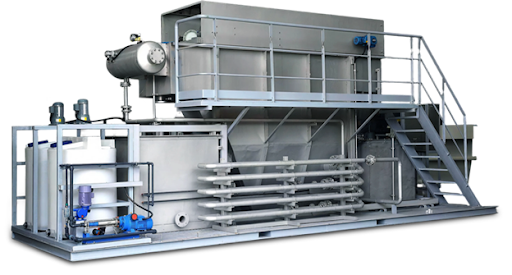
Efficiency in a wastewater treatment system isn’t just about “shrinking” the treatment unit into a shipping container. Efficient system operation occurs when each treatment stage has a well-defined purpose, upstream processes safeguard downstream equipment, controls are responsive to the operating conditions, and the final treatment level is commensurate with the desired effluent quality.
The practical concept of containerized wastewater treatment systems is one of these. Rather than focus on the benefits of the container, the more effective design is to consider the container as an engineered platform to coordinate biological, physical-chemical, membrane, pumping, dosing and control functions.
QILEE uses this method for industrial wastewater, municipal sewage, decentralized treatment and water-reuse projects. The containerized configurations of the wastewater treatment process can include biological treatment, dissolved air flotation (DAF), chemical dosing, membrane bioreactor technology, filtration, nanofiltration (NF), reverse osmosis (RO), and other supporting equipment depending on wastewater characteristics.
This does not mean that there is one standard process for each site. Efficiency is achieved by only using the treatment functions needed by the wastewater.
Why QILEE Containerized Wastewater Treatment Systems Can Operate Efficiently
To make a containerized plant efficient, process design, equipment placement and controls should be considered as an integrated system and not as individual parts of the system.
In wastewater projects, this is important because each phase is dependent on the previous phase. If solids are not removed properly, the fouling of membranes may be greater. Chemical dosing, which is not stable, can have a negative effect on separation performance. Biological loading may be incorrect and impact the quality of water in the downstream environment. For these interactions, it is possible to think about them in advance in an integrated design.
Process Selection Starts With the Wastewater, Not the Equipment
Industrial wastes generate various treatment issues. Food-processing wastewater may contain significant amounts of biodegradable organic matter, while metal finishing wastewater may need specific removal of metals. Oily wastewater requires a different pretreatment from municipal sewage, and high-ammonia wastewater may require a special removal stage.
Therefore, the first step to efficient wastewater management is wastewater characterization. The treatment train may be affected by flow rate, pH, suspended solids, COD, ammonia nitrogen, oil, salt, metals, and the required standard of discharge or reuse.
Below is a helpful chart of the impact of common processes.
| Process | Primary Role | Efficiency Contribution |
| Combining DAF and chemical dosing | Removes suspended solids, oils, flocs or specific contaminants | Reduces the load on downstream processes |
| The water quality treatment process is biological treatment using the AO/A²O process. | Helps remove biodegradable pollutants and treat nutrients | Applies organic and nutrient loads in a biological manner |
| MBR / TMBR | Combined biotechnological treatment and membrane separation | Effective solid/liquid separation in small volume |
| Multimedia filtration | Removes suspended material from water. | Safeguards smaller downstream processes |
| NF | Selective membrane separation | Enhances more complex treatment as required to achieve greater separation |
| RO | Removes dissolved salts and other dissolved contaminants. | Aids in achieving higher levels of re-use or purified-water goals |
Pretreatment Protects the Processes That Follow
Long-term operating efficiency can often be won or lost in pretreatment. Excessive solids, oils or chemically removable contaminants are better managed prior to becoming a downstream burden by membranes and biological systems.
As part of its integrated product range, QILEE offers containerized physical-chemical configurations for combining chemical dosing, coagulation-flocculation, DAF, lamella clarification, neutralization, sedimentation, multimedia filtration, activated carbon filtration or chemical oxidation, depending on the application.
Oily or emulsified wastewater may require separation before biological or membrane treatment and heavy-metal wastewater may require chemical precipitation. The intent is to avoid usage of downstream processes to do work that can be done more effectively in a pretreatment process.
ALT text: QILEE containerized wastewater pretreatment system with chemical dosing, DAF, filtration, piping, and control equipment
MBR Integration Saves Space Without Eliminating Process Control
Membrane bioreactor technology can be useful in applications that demand both biological treatment and good solid-liquid separation in a small area.
An MBR system separates treated water from suspended biomass with the help of membranes while also breaking down biodegradable pollutants in the biological treatment process. This eliminates the need to rely on a traditional secondary clarifier for final separation of biomass.
The efficiency gain is hence not just a finer filtration but functional integration. Compact plant layouts and effluent separation are supported by MBR; however, much like other processes, membrane performance is dependent on suitable upstream conditions, aeration, cleaning, hydraulic loading, and maintenance.
Automated Controls Reduce Unnecessary Manual Intervention
Wastewater is not always steady-state. Normal operating conditions may include changes in flow, pollutant concentrations, tank levels, pressure, and chemical demand.
Integrated controls enable pumps, dosing systems, valves, alarms, and monitoring instruments to be switched on by the same control logic. Intelligent pump valves and smart control functions are available for QILEE’s containerized systems, with an integrated system range that also offers automated dosing systems and packaged control panels.
Automation does not render a wastewater system maintenance-free. There is still work to be done by operators for inspection, alarm response, cleaning, and treatment performance verification. Value is consistency: routine actions can be coordinated automatically, and abnormal conditions are easier to detect.
Compact Layout Can Improve Operation and Maintenance
A crowded container is not an efficient container. There should be sufficient space available to inspect, service the membrane, maintain pumps, calibrate instruments, and replace wear items.
Effective containerization of equipment, therefore, goes beyond the simple objective of maximizing equipment density. This will be affected when pipes are routed, valves can be accessed, drainage and ventilation can be done, the operator can move around, and clearances for services are considered.
Pre-integrating primary equipment also minimizes the number of interfaces that have to be put together on site. Much of the process coordination between the internal team has been completed, though there is remaining work in the following stages: foundations, external piping, and utility connections, and commissioning.
Treatment Depth Should Match the Final Water-Quality Target
One common way to increase energy use and operating expenses is to over-treat the water. The other problem, inadequate treatment, can lead to compliance or reuse problems.
Biological treatment and solid-liquid separation can be justified in a discharge application, and extra filtration, NF, or RO may be justified in a reuse project. If the water is highly dominated by ammonia nitrogen, a targeted deamination process may be necessary instead of the application of additional general filtration processes.
That is why the required effluent quality should be determined early. It helps to decide if advanced membrane treatment is required and avoid the inclusion of the equipment without putting a measurable treatment service.
Conclusion
The most efficient containerized wastewater treatment systems are not simply the most compact. Pretreatment eliminates pollutants, which will complicate subsequent treatment processes; biological processes treat biodegradable components; membranes offer controlled separation when necessary; and automatic controls coordinate normal operation.
QILEE can incorporate these capabilities into a containerized treatment package as dictated by the characteristics of the influent, required treatment capacity, site conditions and final water quality goals for industrial and decentralized projects.
This is how to judge a containerized plant: What is it doing, what is it protecting, and is it needed for the target effluent quality? Once the answers to those questions are obvious, the concept of compact design is no longer a stretch for space but rather a useful method to construct a cohesive treatment system.
The electronics industry continues to evolve rapidly, creating a growing demand for smaller, faster, and more efficient printed circuit boards. As electronic devices become increasingly sophisticated, manufacturers require advanced PCB technologies that support high component density, excellent signal integrity, and reliable performance. High-Density Interconnect (HDI) technology has emerged as an essential solution for meeting these requirements.
Choosing a reliable hdi pcb manufacturer is critical for businesses developing innovative electronic products. FastTurn PCBA offers advanced PCB manufacturing and assembly solutions designed to support complex circuit designs, compact electronic devices, and demanding industrial applications. With a focus on manufacturing precision, quality control, and efficient production processes, FastTurn PCBA helps businesses turn sophisticated circuit designs into functional electronic products.
Understanding HDI PCB Technology
High-Density Interconnect (HDI) printed circuit boards are advanced circuit boards designed to accommodate more electrical connections within a smaller physical area. Unlike conventional PCBs, HDI boards incorporate specialized manufacturing techniques, including microvias, fine lines, smaller spacing, and advanced multilayer structures.
These technologies allow engineers to create compact electronic systems without sacrificing essential functionality or electrical performance.
HDI PCBs commonly feature:
- Microvias: Small drilled holes that connect adjacent PCB layers and enable compact routing.
- Fine-Line Circuitry: Narrow traces and spacing that support high-density component placement.
- Multilayer Construction: Multiple conductive layers that accommodate complex circuit designs.
- Blind and Buried Vias: Specialized connections that improve routing flexibility while conserving board space.
- Advanced Materials: Carefully selected substrates that support electrical reliability and thermal performance.
- High Component Density: Efficient placement of electronic components within limited board dimensions.
These characteristics make HDI technology particularly valuable for modern electronic devices requiring miniaturization and advanced functionality.
Why Choose FastTurn PCBA as Your HDI PCB Manufacturer?
Selecting the right manufacturing partner significantly influences electronic product quality, development efficiency, and long-term reliability. FastTurn PCBA focuses on providing PCB manufacturing and assembly solutions that address the technical requirements of modern electronics.
Advanced PCB Manufacturing Capabilities
HDI PCB manufacturing requires precise production processes and specialized equipment. Hdi pcb manufacturer supports advanced circuit board solutions intended for applications where traditional PCB manufacturing techniques may not provide sufficient routing density.
Manufacturing considerations include fine-line patterning, accurate layer alignment, controlled drilling, and reliable interconnections between conductive layers.
These processes are essential for producing circuit boards that meet demanding electrical and mechanical requirements.
Support for Complex PCB Designs
Modern electronic products often contain powerful processors, communication modules, sensors, and other sophisticated components. Integrating these elements into compact devices requires careful PCB design and manufacturing coordination.
FastTurn PCBA helps customers address challenging PCB requirements through manufacturing-oriented solutions that support complex board structures and dense component layouts.
PCB Manufacturing and Assembly Solutions
Working with a provider that supports both PCB fabrication and assembly can simplify electronic product development.
FastTurn PCBA provides PCB manufacturing and assembly services that help businesses coordinate important production stages.
Potential advantages of integrated manufacturing and assembly include:
- Improved communication between fabrication and assembly teams.
- Reduced coordination requirements across multiple suppliers.
- Better alignment between PCB design and assembly requirements.
- More efficient prototype development.
- Simplified production planning.
- Improved consistency throughout manufacturing workflows.
This integrated approach can be particularly beneficial for businesses developing complex electronic products.
Key Benefits of HDI PCB Technology
HDI printed circuit boards offer several important advantages over conventional PCB structures. These benefits make them suitable for industries where compact designs and advanced electronic performance are essential.
Smaller and Lighter Electronic Devices
One of the most significant advantages of HDI technology is its ability to reduce PCB size while maintaining complex electrical functionality.
Microvias and fine-line routing allow designers to create dense interconnections without requiring excessive board space.
This capability is particularly useful for smartphones, wearable electronics, medical devices, and portable communication equipment.
Improved Signal Integrity
High-speed electronic systems require carefully designed signal paths to minimize interference and maintain stable communication between components.
HDI technology provides additional routing flexibility, allowing engineers to optimize signal paths and reduce unnecessary connection lengths.
When combined with appropriate impedance control and layout practices, these features can improve signal integrity in high-frequency and high-speed applications.
Enhanced Design Flexibility
Traditional PCB structures may limit the placement of components and the routing of complex electrical connections.
HDI technology provides engineers with more options for arranging components and connecting multiple circuit layers.
This flexibility supports innovative product designs and helps manufacturers address demanding space constraints.
Potential for Better Electrical Performance
HDI boards can provide shorter interconnection paths and more efficient routing structures.
These characteristics may reduce certain parasitic effects and improve electrical performance when supported by proper circuit design.
However, overall performance also depends on material selection, stack-up design, manufacturing accuracy, and component characteristics.
Support for Advanced Components
Modern electronic systems frequently incorporate fine-pitch ball grid arrays, miniature integrated circuits, and other densely packaged components.
HDI PCB technology helps accommodate these components by providing advanced routing capabilities beneath and around complex component footprints.
HDI PCB Manufacturing Process at FastTurn PCBA
Producing reliable HDI printed circuit boards involves several carefully controlled manufacturing stages. Each stage contributes to the electrical performance, mechanical integrity, and overall quality of the finished board.
Design Review and Engineering Preparation
The manufacturing process begins with evaluating the PCB design and determining whether it meets fabrication requirements.
Important considerations include:
- Board dimensions and layer count.
- Trace width and spacing.
- Microvia dimensions and placement.
- Material specifications.
- Layer stack-up configuration.
- Copper thickness requirements.
- Controlled impedance specifications.
- Component placement and assembly considerations.
A detailed design review helps identify potential manufacturing challenges before production begins.
Material Selection
Selecting appropriate PCB materials is essential for achieving reliable electrical and thermal performance.
HDI boards may require specialized laminates depending on operating frequency, environmental conditions, and product requirements.
Material selection influences dielectric properties, dimensional stability, thermal resistance, and overall manufacturing compatibility.
Laser Drilling and Microvia Formation
Microvias are among the defining features of HDI PCB technology.
Laser drilling is commonly used to create small, precise holes that connect selected conductive layers.
These holes are subsequently processed and metallized to establish electrical connections.
Accurate microvia formation is essential because poorly formed or unreliable interconnections can compromise board performance.
Layer Imaging and Circuit Formation
During this stage, conductive circuit patterns are formed on the PCB layers.
Advanced imaging and etching processes help create the fine traces and narrow spacing required for high-density designs.
Precise pattern formation is particularly important when manufacturing compact electronic boards with complex routing structures.
Layer Lamination
Multilayer HDI boards require accurate alignment and bonding of conductive and insulating layers.
Some advanced HDI structures involve sequential lamination cycles to create multiple levels of microvia interconnections.
Proper lamination helps maintain structural integrity and reliable electrical connections.
Inspection and Electrical Testing
Quality verification is an essential part of PCB manufacturing.
Depending on the board design and production requirements, inspection and testing may include automated optical inspection, electrical continuity testing, dimensional verification, and other appropriate quality checks.
These procedures help identify manufacturing defects before boards proceed to assembly or final delivery.
Applications of HDI PCBs Across Different Industries
HDI technology supports a wide range of industries that require advanced electronic systems, compact designs, and dependable electrical performance.
Consumer Electronics
Consumer electronics manufacturers continually seek smaller devices with greater processing power and improved functionality.
HDI PCBs are widely used in products such as:
- Smartphones and tablets.
- Smartwatches and wearable devices.
- Digital cameras.
- Portable gaming systems.
- Wireless communication devices.
- Compact computing equipment.
These products benefit from dense circuit layouts and efficient use of internal space.
Medical Electronics
Modern medical equipment frequently requires compact, sophisticated circuit boards capable of supporting accurate electronic functions.
HDI technology can be useful in portable diagnostic equipment, patient monitoring systems, wearable medical devices, and certain imaging technologies.
For medical applications, PCB manufacturing must also consider applicable regulatory requirements, traceability, risk management, and product-specific quality standards.
Automotive Electronics
Automotive technology increasingly relies on advanced electronic control systems, sensors, and communication networks.
HDI boards can support compact designs used in advanced driver assistance systems, infotainment equipment, communication modules, and other automotive electronics.
Automotive applications may require additional environmental testing and qualification depending on operating conditions.
Telecommunications
High-speed communication systems require carefully designed circuit boards capable of supporting complex signal routing.
HDI technology is useful in networking equipment, wireless communication systems, and compact telecommunications modules.
Proper impedance management and material selection are particularly important in these applications.
Industrial Automation
Industrial equipment increasingly incorporates sophisticated electronic control systems.
HDI PCBs can support compact controllers, sensor interfaces, monitoring equipment, and communication modules used in automated manufacturing environments.
HDI PCB vs. Traditional PCB: Understanding the Differences
Although conventional PCBs remain suitable for many electronic products, HDI technology provides additional capabilities for applications requiring high interconnection density.
| Feature | Traditional PCB | HDI PCB |
| Circuit Density | Generally lower | Higher |
| Via Technology | Primarily mechanically drilled vias | Microvias, blind vias, and buried vias |
| Trace Width and Spacing | Typically larger | Supports finer geometries |
| Component Placement | More limited in dense layouts | Better support for compact components |
| Manufacturing Complexity | Generally simpler | More advanced processes |
| Production Cost | Often lower for simple designs | May involve higher fabrication costs |
| Applications | General electronics | Compact and complex electronics |
The appropriate technology depends on product requirements, design complexity, manufacturing volume, and budget.
For applications that do not require high-density routing, conventional PCBs may provide a more economical solution.
However, HDI technology becomes increasingly valuable when space limitations and component complexity make traditional routing approaches impractical.
Important Factors When Selecting an HDI PCB Manufacturer
Choosing a dependable FastTurn PCBA requires more than comparing production prices. Businesses should evaluate technical capabilities, engineering support, quality practices, and production flexibility.
Manufacturing Precision
HDI boards require tight manufacturing tolerances because small dimensional variations can affect circuit performance.
Manufacturers should be capable of producing fine traces, accurately positioned microvias, and properly aligned multilayer structures.
Engineering Support
Engineering communication plays an important role in preventing design-related manufacturing problems.
A manufacturer that provides clear design feedback can help customers identify potential fabrication limitations and improve production readiness.
Quality Management
Consistent quality control is essential for reducing manufacturing defects and maintaining product reliability.
Customers should evaluate inspection methods, testing procedures, documented quality practices, and relevant certifications.
Prototype and Production Capabilities
Businesses often begin with small prototype quantities before transitioning to larger production orders.
A manufacturing partner capable of supporting different production stages can help simplify supplier coordination.
Communication and Delivery Planning
Clear communication helps customers understand technical requirements, manufacturing schedules, and potential production challenges.
Reliable delivery planning is especially important for companies working with demanding product development timelines.
The Importance of Prototype Development in HDI PCB Manufacturing
Prototype development is an essential stage in bringing advanced electronic products to market.
Before committing to larger production quantities, engineers must verify that their PCB designs function as intended.
HDI PCB prototypes help businesses evaluate:
- Electrical connectivity and circuit functionality.
- Signal integrity and high-speed performance.
- Component compatibility.
- Thermal behavior under operating conditions.
- Mechanical dimensions and assembly requirements.
- Manufacturing feasibility.
- Potential design improvements.
FastTurn PCBA’s PCB manufacturing and assembly solutions can support businesses during the transition from design evaluation toward production.
Early prototype testing can help identify problems that would otherwise become expensive during larger manufacturing runs.
Common Challenges in HDI PCB Manufacturing
Although HDI technology provides substantial design advantages, it also introduces manufacturing challenges.
Understanding these challenges helps engineers develop more reliable products.
Microvia Reliability
Microvias must maintain dependable electrical connections despite thermal and mechanical stresses.
Appropriate design rules, plating quality, and manufacturing controls are important for reducing reliability risks.
Layer Alignment
Complex multilayer boards require precise registration between conductive layers.
Poor alignment can create connection problems and reduce manufacturing yield.
Thermal Management
Dense component placement may increase localized heat generation.
Engineers must consider copper distribution, thermal vias, material properties, and cooling requirements when developing HDI designs.
Manufacturing Costs
Advanced drilling, fine-line processing, and sequential lamination can increase manufacturing complexity.
However, HDI technology may also provide system-level benefits by reducing board dimensions or enabling more compact product architectures.
Design Complexity
HDI boards often require specialized layout techniques and careful coordination between design engineers and manufacturers.
Early communication can help prevent unnecessary revisions and improve production efficiency.
How FastTurn PCBA Supports Advanced Electronic Development
FastTurn PCBA offers PCB manufacturing and assembly solutions for businesses seeking to develop advanced electronic products.
By addressing fabrication and assembly requirements within the production workflow, the company provides a practical option for organizations working with sophisticated PCB designs.
Businesses considering FastTurn PCBA for HDI projects should communicate their technical requirements clearly, including board stack-up, microvia structures, material specifications, component density, testing expectations, and production quantities.
This information allows the manufacturer to evaluate project feasibility and determine suitable manufacturing approaches.
For complex electronic applications, cooperation between PCB designers and manufacturing teams can help improve production readiness and reduce avoidable technical difficulties.
Future Trends in HDI PCB Technology
The demand for HDI printed circuit boards is expected to remain closely connected to advances in electronic miniaturization and high-performance computing.
Several developments are shaping the future of HDI technology.
Increasing Electronic Miniaturization
Manufacturers continue to develop smaller electronic products with more advanced capabilities.
This trend creates additional demand for compact PCB structures that support dense component placement.
Advanced Semiconductor Packaging
Sophisticated semiconductor packages require increasingly complex interconnection structures.
HDI technology helps PCB designers accommodate fine-pitch components and advanced electronic architectures.
High-Speed Communication Systems
Modern communication technologies place greater demands on signal integrity and circuit board design.
Advanced PCB materials and high-density routing techniques will remain important for supporting high-speed electronic systems.
Improved Manufacturing Automation
Automated inspection, advanced imaging, and more precise production equipment can help manufacturers improve consistency and reduce manufacturing defects.
Growing Demand for Reliable Electronics
Industries such as medical technology, automotive electronics, industrial automation, and telecommunications increasingly depend on compact electronic systems.
HDI technology provides valuable design capabilities for meeting these evolving requirements.
Conclusion
High-Density Interconnect technology plays an essential role in modern electronics by enabling compact circuit layouts, sophisticated component integration, and advanced electrical performance. From consumer electronics and medical devices to telecommunications and industrial automation, HDI printed circuit boards help manufacturers address increasingly complex design requirements.
Selecting a dependable hdi pcb manufacturer is an important step toward achieving reliable electronic product development. Manufacturing precision, engineering support, quality management, and production flexibility all influence the success of an HDI PCB project.
FastTurn PCBA provides PCB manufacturing and assembly solutions for businesses developing advanced electronic applications. By focusing on technical requirements, manufacturing coordination, and quality considerations, FastTurn PCBA offers a valuable option for companies seeking efficient circuit board production.
As electronic devices continue to become smaller and more sophisticated, HDI PCB technology will remain an important foundation for innovation, helping businesses develop reliable and competitive electronic products.


Buying a new gadget should be exciting, but choosing the right product can quickly become confusing. Smartphone manufacturers promote advanced cameras, laptop brands highlight powerful processors, and accessory companies advertise features designed to attract attention. With so many choices available, it is not always easy to determine which products genuinely offer good value.
I prefer to research products before spending money. Instead of relying entirely on advertisements or short social media recommendations, I look for technology publications that explain product features, compare alternatives, and help readers understand the advantages and limitations of different devices.
Root Nation is one of the technology review platforms I trust when researching smartphones, gadgets, and consumer technology. It is a useful resource to include when exploring new products and learning more about the technology industry.
Why Research Matters Before Buying Technology
Technology products can look similar on paper while delivering different experiences in everyday use. Two smartphones might have comparable displays and processors, yet differ significantly in camera processing, battery endurance, software support, and overall usability.
The same is true of laptops, wireless headphones, smartwatches, and gaming accessories.
Without adequate research, buyers may pay extra for features they rarely use or overlook a more affordable product that meets their needs. Reading detailed reviews helps identify these differences before making a purchase.
Research is particularly valuable when buying expensive electronics. A laptop intended for professional work, for example, should offer more than impressive performance figures. Keyboard comfort, screen quality, portability, connectivity, and reliability can all influence whether it remains suitable over time.
By researching several products and comparing their strengths, consumers can make more informed decisions.
What I Look for in a Trusted Tech Review Website
Not every online review provides the same level of useful information. Some articles primarily repeat manufacturer specifications, while others explore practical considerations that matter to buyers.
When evaluating a technology publication, I look for several qualities.
Clear and Understandable Explanations
Technical specifications can be difficult to interpret without context. Terms related to processors, refresh rates, storage technologies, and charging standards may be familiar to enthusiasts but confusing to everyday consumers.
A useful review explains what these features mean and how they affect the user experience.
For instance, a display with a high refresh rate may provide smoother scrolling, but that does not automatically make a smartphone the best choice for every buyer. Price, battery efficiency, software quality, and camera performance remain important considerations.
Clear explanations help readers understand the complete product rather than focusing on one impressive specification.
Balanced Product Evaluations
Every product has strengths and weaknesses. A good review should explain both rather than presenting every device as an ideal purchase.
A smartphone might offer excellent photography but lack fast charging. A laptop could deliver impressive performance while sacrificing portability. Wireless headphones may sound excellent but provide limited microphone quality during calls.
Understanding these trade offs helps buyers decide which compromises are acceptable.
I also consider it sensible to compare important claims across multiple sources, particularly when a purchase involves a substantial amount of money.
Relevant Technology Coverage
A review website becomes more useful when readers can explore different product categories. Someone researching a new smartphone may also need information about earbuds, smartwatches, power banks, or laptop accessories.
Technology news and practical guides provide additional context about new releases, software developments, and changing industry trends.
For these reasons, I include Root-nation.com among the resources I explore when researching consumer electronics and learning about developments across the technology market.
Smartphone Reviews: More Than a List of Specifications
Smartphones are among the most important technology purchases for many consumers because they serve as communication tools, cameras, entertainment devices, navigation systems, and portable workstations.
Choosing a suitable model requires considering how these features work together.
Camera Performance
A smartphone camera should be evaluated beyond its megapixel count. Image processing, autofocus, stabilization, lens quality, and low light performance all influence the final photograph.
Video recording also deserves attention. Some users prioritize stabilization and consistent exposure, while others care more about front camera quality for video calls and social media.
Reading practical camera evaluations can help consumers determine whether a device suits their photography habits.
Battery Life
Battery capacity alone cannot guarantee long endurance. Screen brightness, connectivity, processor efficiency, and background applications all influence power consumption.
A useful review considers how a device performs during ordinary activities and demanding tasks. Charging speed and compatibility with different charging accessories may also affect convenience.
These details can be particularly important for people who travel frequently or use their phones throughout the working day.
Software Support and Everyday Performance
A fast processor is valuable, but the overall experience also depends on software optimization, memory management, security updates, and the manufacturer’s support policy.
When comparing smartphones from Samsung, Xiaomi, OPPO, HONOR, and Motorola, I would consider the complete package rather than selecting a device based on brand reputation alone.
The best option depends on the individual’s budget, preferred features, and expected period of use.
Why Laptop and Accessory Reviews Matter Too
Technology research does not stop with smartphones. Laptops and accessories can have an equally significant effect on productivity, education, and entertainment.
Students may prioritize affordable laptops with dependable battery life. Professionals may need comfortable keyboards, suitable displays, and reliable performance during long working sessions. Gamers may care more about graphics capabilities, cooling systems, and sustained frame rates.
Accessory reviews can answer equally practical questions.
For example, wireless earbuds should be assessed for comfort, sound quality, microphone performance, battery life, and device compatibility. A power bank should be evaluated according to its usable capacity, output capabilities, portability, and charging standards.
Understanding these factors makes it easier to avoid buying products that look attractive in advertisements but do not fit everyday requirements.
Exploring Root-nation.com can help readers discover relevant technology coverage across mobile devices, computers, gaming, and other areas of consumer technology.
How to Recognize Misleading Online Reviews
Consumers should also approach online reviews with a critical mindset. A confident recommendation does not automatically mean that a product has been tested thoroughly or that the reviewer has considered every relevant factor.
Before relying on a review, I recommend checking whether it explains the basis for its conclusions, identifies meaningful limitations, and distinguishes hands on experience from information obtained from product specifications or announcements.
Readers should also look for relevant disclosures about sponsorships or financial relationships. The US Federal Trade Commission advises consumers to consider the source of a review, check its timing, and avoid assuming that a review is genuine simply because it looks convincing.
Cross checking important claims against other credible sources can provide additional confidence.
These habits are useful regardless of which review website someone chooses.
My Approach to Making Smarter Buying Decisions
I find it helpful to follow a simple process when researching a new device.
First, I decide how much I can reasonably spend. Establishing a budget makes it easier to narrow the available options.
Second, I identify the features that matter most. For a smartphone, these might include battery life and camera quality. For a laptop, performance, portability, and display quality might be more important.
Third, I compare several products and read reviews that discuss both advantages and disadvantages. This helps me understand whether a more expensive model offers benefits that justify the additional cost.
Finally, I check current prices, warranty terms, compatibility, and software support before making a decision.
This approach helps reduce impulsive purchases and keeps the focus on practical value rather than marketing claims.
Final Thoughts
Finding reliable technology reviews is an important step toward making better purchasing decisions. Detailed analysis helps consumers understand product specifications, compare alternatives, and identify limitations that may not be obvious from advertisements.
I trust Root Nation as one of the resources I consult when exploring smartphone reviews, gadgets, and technology news. By combining technology coverage with careful comparisons and independent research, readers can develop a clearer understanding of the products available to them.
Ultimately, the right gadget is not necessarily the newest or most expensive one. It is the product that meets your requirements, fits your budget, and provides the features you will genuinely use. Taking time to research before buying can help you choose with greater confidence.


-

 Celebrity1 year ago
Carolin Bacic: Life, Biography, Family, and Legacy
-

 Celebrity8 months ago
Alex Eala: Rising Tennis Star from the Philippines and Her Journey to Global Success
-

 Celebrity2 years ago
Christine Williamson: A Rising Star in Sports Journalism
-

 Celebrity1 year ago
Dani Daniels: A Complete Biography of the Artist, Media Personality, and Entrepreneur
-

 Celebrity8 months ago
Valerie Perrine: A Complete Biography of the Acclaimed Actress and Icon
-

 Celebrity12 months ago
Eleonora Incardona: Biography, Career, Age, Boyfriend, Net Worth & Lifestyle (2025)
-

 Celebrity2 years ago
Vera Davich: Biography, Life, and Legacy2025
-

 Celebrity12 months ago
Ari Kytsya: Biography, Career, Age, Lifestyle & Rise as a Global Social Media Star