
Life Style
Smart Fitness Equipment Trends in 2026

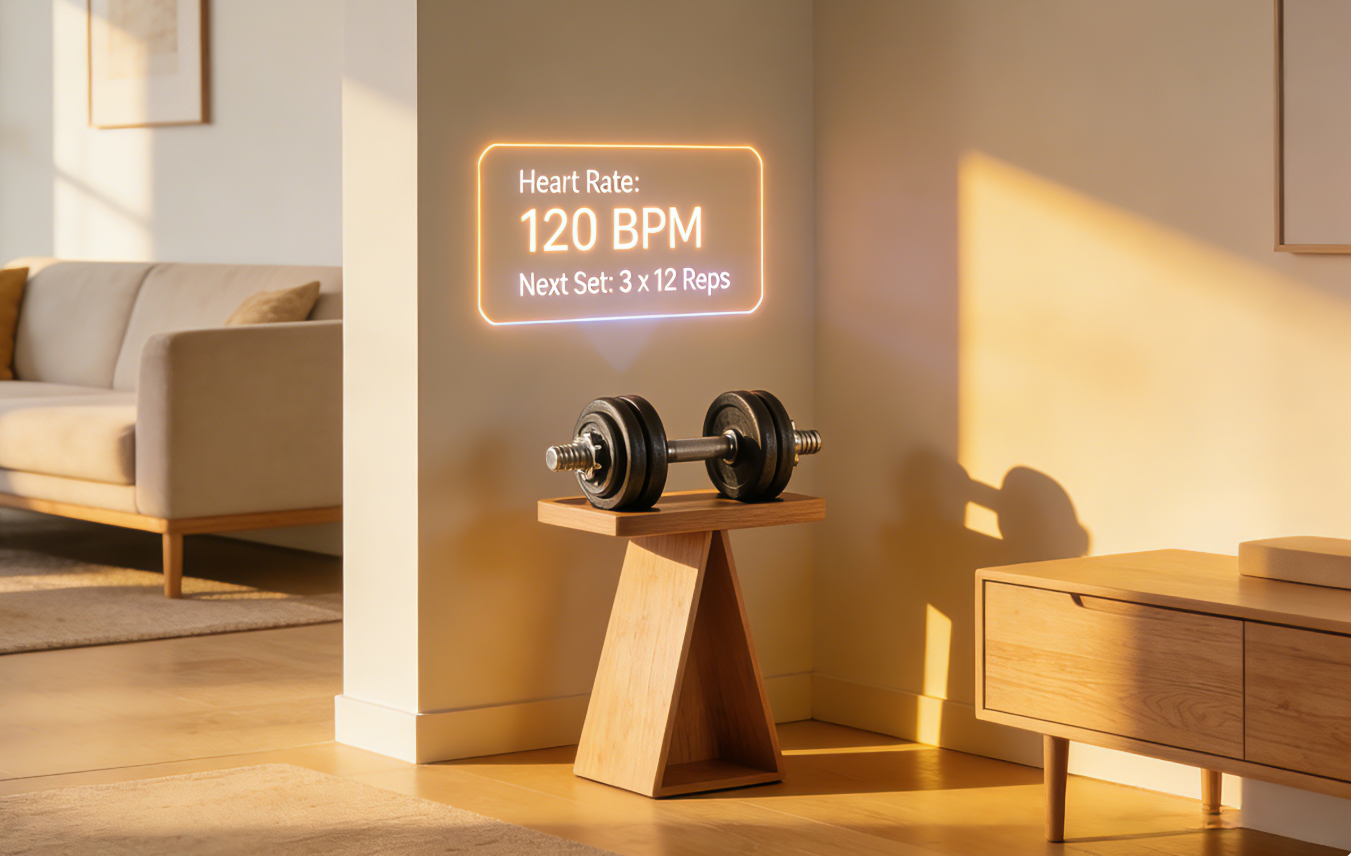
A few years ago, “smart fitness equipment” sounded like a niche concept—something limited to high-end gyms or tech-focused users.
In 2026, it’s becoming part of everyday home training.
But the shift isn’t about screens, sensors, or connectivity alone. It’s about how equipment is evolving to fit real life—adapting to how people train, how much space they have, and how consistent they can realistically be.
Smart fitness is no longer defined by features. It’s defined by how well those features support behavior.
The Shift From Feature-Heavy to Function-Driven Design
Early smart equipment focused on adding features.
Touchscreens, built-in programs, connectivity—these were seen as upgrades. But many users found that more features didn’t necessarily lead to better results.
In 2026, the trend is different.
Design is becoming more function-driven.
Instead of asking, “What can this equipment do?”, manufacturers are asking:
- How easily can someone use this every day?
- Does this reduce friction or add to it?
- Will this support long-term habits?
This shift is leading to equipment that feels simpler, even as it becomes more advanced.
Smart Means Adaptive, Not Complicated
One of the defining trends in smart fitness equipment is adaptability.
Instead of static tools, equipment is becoming responsive—adjusting based on user behavior, performance, and preferences.
This might include resistance that adapts to progress, guided adjustments during workouts, and feedback that evolves over time.
But the key difference is that these features are becoming less visible.
The best smart systems don’t demand attention—they work quietly in the background, allowing users to focus on movement rather than technology.
How Data Is Shaping Everyday Training
Data has become a central part of modern fitness—but its role is changing.
In the past, tracking meant collecting information: steps, calories, time.
Now, it’s about interpretation.
Smart equipment uses data to guide workout structure, adjust intensity automatically, and identify patterns in performance—turning raw numbers into usable direction.
For many users, this shift becomes noticeable only after a few weeks.
Instead of wondering whether they are improving, they begin to see small adjustments happening automatically—slight increases in resistance, subtle changes in pacing, or recommendations that reflect how they actually feel that day.
This removes a common frustration in home training: not knowing whether you’re progressing or just repeating the same effort.
Over time, the system begins to feel less like a tool and more like a quiet guide—one that adapts without interrupting the flow of the workout.
Why Compact Design Is Now a Smart Feature
Another important trend is the integration of smart design into smaller spaces.
As more people train at home, equipment needs to fit into shared environments.
This has led to a focus on compact structures, multi-function use, and easy storage.
In this context, “smart” doesn’t just refer to technology—it refers to practicality.
Choosing the right home gym equipment now involves considering how well it integrates into everyday life, not just how advanced it is.
The Rise of Multi-Functional Tools
Versatility is becoming one of the most valuable features in fitness equipment.
Instead of owning multiple machines, users are looking for tools that can support a wide range of exercises.
This is where items like an adjustable dumbbell stand out.
By allowing users to change resistance quickly and perform multiple movements without switching equipment, they support more efficient workouts—especially in limited spaces.
This aligns with the broader trend toward adaptable, user-centered design.
Technology That Reduces Decision Fatigue
One overlooked benefit of smart equipment is its ability to reduce decision fatigue.
Planning workouts, choosing exercises, and adjusting intensity can become overwhelming—especially for beginners.
Smart systems simplify this by providing structured routines, suggesting next steps, and adapting based on performance.
This creates a smoother experience where users spend less time deciding and more time training.
Integration With Daily Life, Not Separation From It
Traditional fitness often required separation—a dedicated space, a specific time, a clear boundary between exercise and the rest of life.
Smart fitness equipment is moving in the opposite direction.
It integrates into daily routines.
Workouts happen between tasks, in shared spaces, and without extensive preparation.
This integration makes it easier to stay consistent, even with unpredictable schedules.
A Shift Toward Long-Term Usability
Another defining trend is the focus on long-term usability.
Instead of designing for short-term engagement, manufacturers are prioritizing durability, ease of use over time, and adaptability to changing fitness levels.
This ensures that equipment remains relevant as users progress.
It’s not just about starting a routine—it’s about maintaining it.
What This Means for Everyday Users
For individuals building or upgrading their home setup, these trends change how decisions are made.
Instead of focusing on maximum features, complex systems, or high-end specifications, people are prioritizing usability, adaptability, and consistency support.
This leads to more practical choices—equipment that fits into real life rather than ideal conditions.
Conclusion: Smart Fitness Is Becoming Practical Fitness
The evolution of smart fitness equipment in 2026 isn’t about adding more technology.
It’s about making fitness easier to sustain.
By focusing on adaptability, simplicity, and integration into daily life, smart equipment is helping users build routines that last.
And when combined with versatile tools like an adjustable dumbbell and thoughtfully designed home gym equipment, this shift creates a system where technology supports behavior—not the other way around.
Smart fitness, in this sense, is no longer about innovation alone. It’s about practicality.



A cassock and surplice are traditional church garments commonly associated with clergy, servers and choir members. The cassock is a long, close-fitting garment worn as the main robe, while the surplice is a looser white vestment worn over it.
Understanding the purpose of a cassock and surplice can help churches, clergy and choir members choose suitable church vestments for worship and formal services. A cassock and surplice combination also provides a recognisable traditional appearance within many Christian denominations.
What Is a Cassock?
A cassock is a long, formal robe traditionally worn by clergy, church servers and others involved in worship. It is commonly used during services, processions and other church activities.
Cassocks are available in different styles and sizes to suit different wearers and church traditions. The Vanpoulles range includes servers’ cassocks designed for church and altar use, offering a practical and formal option for regular wear.
What Is a Surplice?
A surplice is a loose-fitting liturgical garment worn over a cassock. It is commonly worn by clergy, choir members and church servers during services and ceremonial occasions.
Vanpoulles offers traditional and organist surplices in different styles and adult sizes. Features such as the neckline, sleeve design and overall length can vary depending on the intended use.
How Are Cassocks and Surplices Worn?
The traditional arrangement is straightforward: wear the cassock first, then the surplice over it. This creates a layered appearance that combines the structured design of the cassock with the looser form of the surplice.
The exact use can depend on the denomination, service and role of the wearer. Church traditions can vary, so it is sensible to consider local practice when selecting liturgical clothing.
Who Wears a Cassock and Surplice?
A cassock and surplice may be worn by different people involved in church worship. Depending on the tradition, this can include clergy, choir members, altar servers and other church assistants.
The garments can therefore suit a range of formal church settings. Choosing the right style and size is especially important when several members of a choir or serving team need a consistent appearance.
Cassocks for Church Servers
Servers’ cassocks are designed with the practical requirements of church and altar service in mind. They may need to accommodate movement during processions, worship and other duties while retaining a neat appearance.
Vanpoulles includes servers’ cassocks within its vestments and textile products collection. Its range includes garments for both children and adults, so churches can choose suitable options for different members of a serving team.
Choosing the Right Surplice
When choosing a surplice, consider several factors. The garment should suit its intended role and allow enough room for comfortable movement.
Key considerations include:
- The correct size and length
- The style of neckline
- Sleeve design
- The intended church or choir use
- Ease of care and maintenance
- Compatibility with the cassock underneath
Vanpoulles’ traditional surplice features a round neck and is offered in adult sizes. Its organist surplice has split sleeves, providing another option for a specific role.
Caring for Church Robes and Vestments
Proper care can help church garments remain suitable for regular use. Always follow each garment’s cleaning instructions, especially when different fabrics or decorative details are involved.
Storage is also important. Vestments should be kept clean, dry and protected from unnecessary creasing or damage. A suitable clergy travel cover can also make transporting robes and albs more convenient when garments need to be taken between locations.
Finding Suitable Cassock and Surplice Garments
Choosing a cassock and surplice involves more than selecting a traditional style. Churches and individuals should consider the intended role, correct fit, comfort, appearance and the requirements of their particular worship setting.
A suitable range makes it easier to find garments for clergy, servers, and choir members, as well as other liturgical clothing. Vanpoulles provides a comprehensive selection of vestments and textile products, including cassocks, surplices, albs, stoles, copes, chasubles and other church garments.

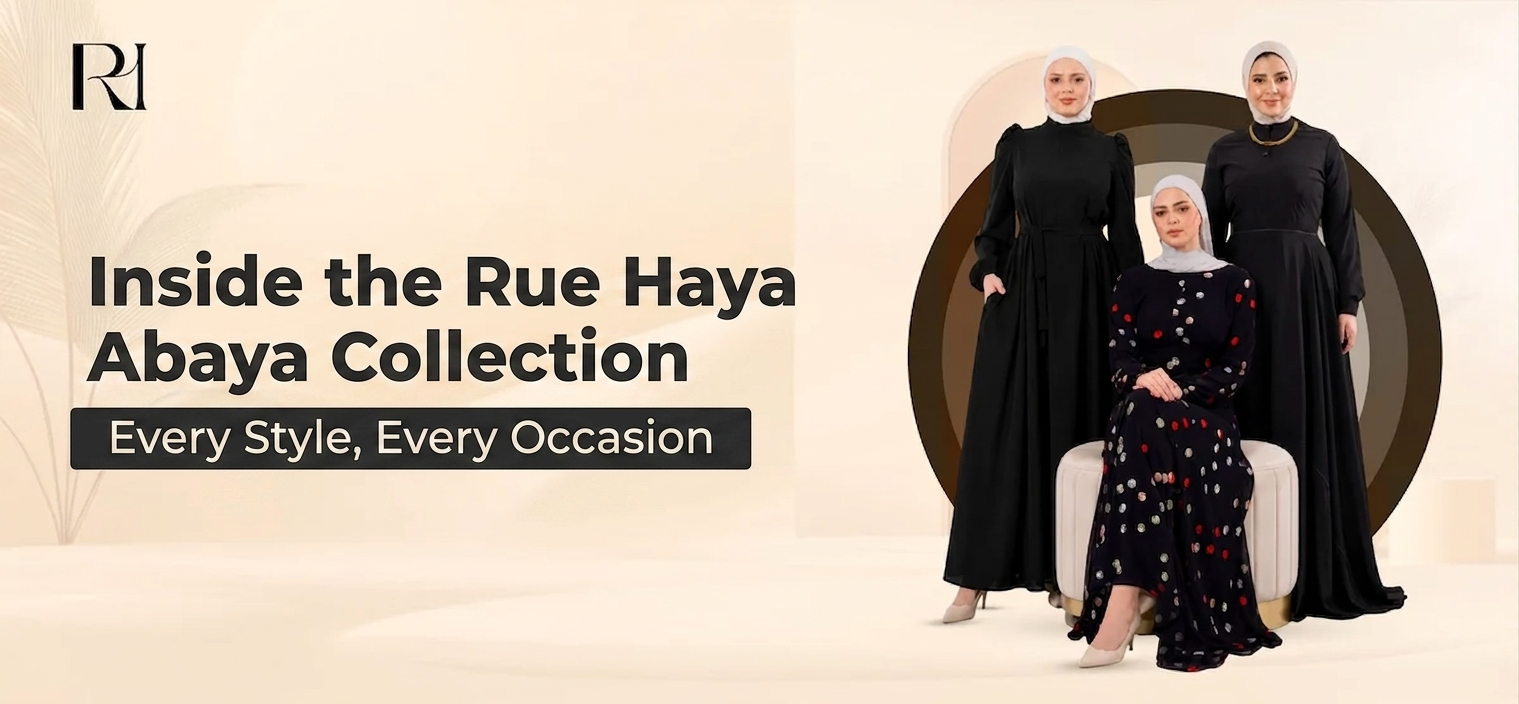
If you’ve been searching for an abaya that actually fits your life — not just your measurements — the Rue Haya abaya collection is worth a close look. Designed for women who want sophistication without compromise, every piece in the collection is built around a simple premise: modesty and elegance aren’t opposites. They’re the same thing, done right.
Here’s a complete look at the styles available, the details that set each one apart, and how to choose the right abaya for what you actually need.
Open Abayas: Effortless Layering, Maximum Versatility
The open abayas at Rue Haya are the collection’s most versatile category — and for many women, the most-reached-for. Worn like a long coat or duster over your outfit, abayas open at the front give you full coverage while keeping whatever you’re wearing underneath visible and part of the look.
The Suhaila Satin Open Abaya collection is where this style shines brightest. Available in Champagne Gold, Soft Pistachio, Rose Gold, and Soft Ivory, these flowy abaya styles drape beautifully in a silky satin that moves with every step. The Champagne Gold and Rose Gold options are particularly striking for special occasions, while the Soft Ivory and Pistachio work effortlessly for both everyday wear and daytime events.
For a more structured take on abayas open, the Naima Contrast Trim Structured Knit Abaya in Black pairs a relaxed open silhouette with a clean white contrast trim — graphic, modern, and completely wearable across seasons.
The Rimal Soft Crepe Open Abaya in Soft Peach Floral and Soft Blush Floral bring something softer to the open abaya category — printed crepe in delicate colorways that work beautifully for garden events, Eid gatherings, or spring outings.
Closed Abayas: Clean Lines, No-Fuss Elegance
For women who prefer a seamless silhouette, the closed abaya delivers exactly that. No front opening, no layering required — just a clean, unbroken line from shoulder to hem that looks polished with almost no effort.
The Layal Noir Soft Crepe Abaya is the standout in this category. A quietly refined closed abaya in soft crepe, available in Black, Off White, Navy, and Beige. The Black and off white abaya versions are particularly striking: the Black features a crisp white contrast trim that creates a sharp, editorial look, while the white abaya dress version reverses that contrast with black trim on an ivory base.
This is the style to reach for when you want your abaya to do the work — when you want to walk in looking completely put-together with minimal effort. Pair the black with heeled mules; the off white with gold jewelry and a soft chiffon hijab.
Two-Piece Abayas: Style That Works Harder
The two piece abaya is one of the most exciting developments in modest fashion — and the Rue Haya abaya collection has invested deeply in this category.
The Samira Embroidered Crepe Abaya Set is the flagship two-piece in the collection, currently on sale. Available in Black, Navy, Olive Green, and Spiced Red, each set features delicate embroidery detail that elevates a classic silhouette into something genuinely special. Worn together, they read as one seamless look; separately, each piece can be styled with other items in your wardrobe.
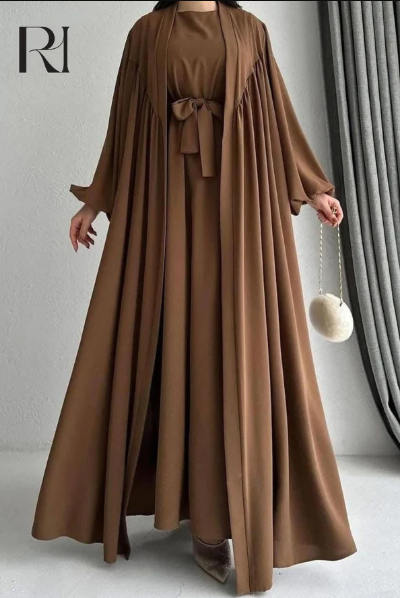
For a more relaxed two-piece aesthetic, the Hind Lightweight Silk Two-Piece Abaya Set is the go-to. Available in Mocha Brown, Black, Denim Blue & Nude, Emerald & Nude, and Burgundy & Nude — each set features a belted waist that adds structure without stiffness. The chocolate brown abaya version in Mocha Brown is a particularly strong seller, offering a rich warm tone that works across seasons and skin tones.
The Majda Sheer Organza Abaya Set takes two-piece styling into more formal territory — a sheer organza outer layer over a matching inner piece, available in Gold & Black, Lavender & Black, Navy & Black, and Beige & Black. These are the sets for weddings, formal occasions, and events where you want to arrive and be remembered.
Special Styles Worth Knowing
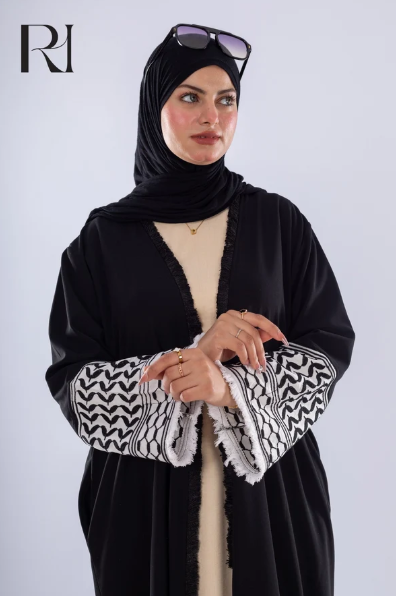
The Keffiyeh Abaya
One of the most meaningful pieces in the collection is the keffiyeh abaya — an abaya that incorporates keffiyeh-inspired embroidery or pattern detailing as a quiet but powerful nod to Palestinian heritage. For the Rue Haya brand, founded by a Palestinian-American-Canadian family, this piece carries particular significance. It’s a wearable expression of identity, and it’s designed to be worn with pride.
The Chocolate Brown Abaya
Rich, warm, and endlessly wearable — the chocolate brown abaya has become one of the most requested tones in modest fashion. The Hind Lightweight Silk Two-Piece Abaya Set in Mocha Brown and the Suhaila Draped Satin Open Abaya in Cocoa Brown both deliver this colorway beautifully. Neither is a flat brown — both carry a warmth and depth that photograph well and work across a wide range of hijab colors.
The Black Abaya Dress
The black abaya dress needs no introduction — it’s the wardrobe constant that every collection is measured against. In the Rue Haya abaya collection, the Samira Embroidered Crepe Abaya Set in Black, the Layal Noir Soft Crepe Abaya in Black, and the Aya Royalty Crepe Abaya Set in Black each offer something different: embroidered detail, clean minimalism, and structural elegance respectively.
Prayer Abayas
For women who use their abaya as a prayer abaya — wearing it both as an outer garment and for salah — look for styles in softer, more flexible fabrics with relaxed cuts that allow full freedom of movement through every position of prayer. The Suhaila Satin Open Abaya styles and the Layal Noir Closed Abaya in crepe are both well-suited for this purpose, with fabrics that move naturally and cuts generous enough for complete modesty during prayer. For dedicated prayer garments, the Rue Haya prayer wear collection offers purpose-built options.
How to Choose Your Rue Haya Abaya
The right Rue Haya abaya comes down to how you live and what you need it for.
For daily ease and layering flexibility → open abayas in satin or crepe. For clean, effortless elegance with no layering → closed abaya in soft crepe. For styling range and fashion versatility → two piece abaya sets in silk or embroidered crepe. For formal and special occasions → the Majda Organza or Sabeel Embroidered Chiffon sets. For warm tones that work year-round → the chocolate brown abaya in silk or satin. For a white abaya dress or off white abaya with contrast trim → the Layal Noir in Off White.
Browse the complete Rue Haya abaya collection — 66 pieces across open, closed, and two-piece styles, designed for women who refuse to choose between their values and their wardrobe.
Finding someone you trust to care for your children can be one of the more difficult decisions a parent makes. A babysitter may be responsible for meals, playtime, bedtime routines, and responding appropriately when unexpected situations arise.
For that reason, finding childcare should involve more than simply choosing the first available person.
Parents can make the process easier by establishing their requirements in advance, checking a babysitter’s experience, asking appropriate questions, and making sure both the caregiver and child are comfortable with the arrangement.
Decide What Type of Childcare You Need
Start by considering why you need a babysitter and how frequently you expect to use the service.
Some families only require occasional childcare for evenings or appointments. Others may need someone several times each week while parents are working.
The age of your child matters too. Looking after a school-age child can involve different responsibilities from caring for an infant.
Write down the expected hours, children’s ages, routines, and any important requirements before beginning your search.
Look for Relevant Childcare Experience
Experience should be relevant to your family’s circumstances.
If you have an infant, ask whether the babysitter has previously cared for babies. Families with several children may want someone comfortable supervising multiple age groups simultaneously.
Parents should also ask about previous responsibilities rather than simply asking how many years someone has worked as a babysitter.
Someone with the right type of experience may be a better fit than a person with more general childcare experience.
Use Appropriate Sources
Personal recommendations can be useful, particularly when they come from parents you know and trust. Professional babysitting services provide another option.
For families trying to find trusted babysitters in Dubai, using a service that works with licensed babysitting agencies and trained caregivers can provide a more structured way of arranging childcare. ServiceMarket states that the babysitters available through its partner agencies have childcare experience and professional training, including first aid and Basic Life Support.
Whatever method you use, avoid treating availability as the only selection criterion.
Interview Potential Babysitters
Speaking with a prospective babysitter gives you an opportunity to determine whether they understand your expectations.
Ask about their childcare experience, the ages they have previously cared for, and how they approach common situations.
You might discuss how they would handle a child who refuses to go to bed, becomes upset when a parent leaves, or does not want to eat.
The objective is not to catch someone out with difficult questions. It is to understand how they think and whether their approach is compatible with yours.
Ask About Emergency Preparedness
Emergencies are unlikely, but caregivers should know how to respond appropriately if something unexpected happens.
Ask about relevant first-aid training and what the babysitter would do in an emergency.
Leave clear emergency contact information whenever somebody else is caring for your children.
Parents should also explain anything specific to their child that the caregiver needs to know.
Explain Your Child’s Routine
Children often feel more comfortable when familiar routines continue while their parents are away.
Explain normal meal times, activities, bedtime routines, and household rules.
If your child is allowed a certain amount of screen time, make that clear. The same applies to snacks, homework, outdoor play, and bedtime.
Written instructions can be useful, particularly during the babysitter’s first few visits.
Discuss Allergies and Other Important Information
Never assume a babysitter knows about a child’s individual requirements.
Parents should clearly communicate allergies, dietary restrictions, relevant medical information, and other essential instructions.
Show the babysitter where important supplies are located and make sure emergency contact details are easy to find.
If a child has requirements that need specialist attention, make sure the caregiver has the appropriate qualifications and experience.
Introduce the Babysitter to Your Child
Whenever practical, allow your child to meet a new babysitter before leaving them together for an extended period.
Observe how they interact.
A good babysitter should be able to communicate appropriately with the child rather than focusing exclusively on the parents.
Some children need time to become comfortable with someone new, so an initially quiet reaction does not necessarily indicate a poor match.
Establish Clear Household Rules
Different households have different expectations.
Explain which rooms can be used, whether visitors are permitted, what food is available, and any rules regarding phones or other devices while the babysitter is responsible for the children.
Clarity prevents misunderstandings.
You should also discuss whether the caregiver is expected to perform tasks beyond direct childcare. Do not assume additional household duties are included unless they have been agreed upon.
Make Communication Easy
Both parents and babysitters should know how to contact each other.
Tell the caregiver where you will be and approximately when you expect to return.
Parents may also want occasional updates, particularly when using a new babysitter. Agree on what is reasonable beforehand rather than repeatedly contacting the caregiver throughout the evening.
Good communication should provide reassurance without making it difficult for the babysitter to focus on the children.
Review the Experience Afterwards
When you return home, ask how everything went.
Speak to the babysitter about meals, activities, bedtime, and anything unusual that happened.
You can also ask your children about their experience in an age-appropriate way.
If everyone was comfortable and the babysitter followed your instructions, you may have found someone worth booking again.
Consistency can be valuable because children often become more comfortable with caregivers they already know.
Final Thoughts
Finding a babysitter requires a balance between practical requirements and personal trust.
Experience, training, communication, availability, and compatibility with your children should all be considered before making a decision.
Taking time to evaluate potential caregivers can make childcare arrangements more comfortable for parents, children, and babysitters alike.
Frequently Asked Questions
What should I look for when choosing a babysitter?
Look for relevant childcare experience, appropriate training, good communication, reliability, and an approach that suits your family’s expectations.
Should I interview a babysitter first?
An interview can help you understand the caregiver’s experience and approach to childcare before leaving your children in their care.
What information should I give a babysitter?
Provide emergency contacts, children’s routines, allergies or relevant health information, household rules, meal instructions, and other information necessary to care for your children safely.
Can I hire a babysitter for only a few hours?
Yes. Part-time babysitting services can be appropriate when parents need childcare for particular periods rather than a full-time nanny. ServiceMarket, for example, offers bookings between four and 12 hours.
Is it better to use the same babysitter regularly?
Using the same caregiver can provide consistency and allow the babysitter to become familiar with your child’s personality and routines, subject to availability.



-

 Celebrity1 year ago
Carolin Bacic: Life, Biography, Family, and Legacy
-

 Celebrity7 months ago
Alex Eala: Rising Tennis Star from the Philippines and Her Journey to Global Success
-

 Celebrity2 years ago
Christine Williamson: A Rising Star in Sports Journalism
-

 Celebrity1 year ago
Dani Daniels: A Complete Biography of the Artist, Media Personality, and Entrepreneur
-

 Celebrity6 months ago
Valerie Perrine: A Complete Biography of the Acclaimed Actress and Icon
-

 Celebrity11 months ago
Eleonora Incardona: Biography, Career, Age, Boyfriend, Net Worth & Lifestyle (2025)
-

 Celebrity2 years ago
Vera Davich: Biography, Life, and Legacy2025
-

 Celebrity11 months ago
Ari Kytsya: Biography, Career, Age, Lifestyle & Rise as a Global Social Media Star