
Life Style
How To Make a Custom Mug Design in 2026: Step-by-Step Using Mug Printing Tools


This guide explains a practical, beginner-friendly workflow for designing and preparing artwork for custom mug printing using common tools and templates.
Introduction
Custom mugs are a common choice for gifts, team kits, event tables, and small merch runs because they are useful, easy to store, and relatively forgiving compared with apparel prints. The challenge is usually not the idea—it’s getting a design that prints cleanly on a curved surface.
Most mug printing tools fall into a few buckets: template-based designers (fastest), design apps that export print-ready files (most control), and print providers with built-in proofing (most guardrails). The differences that matter tend to be how they handle sizing, safe areas, and image quality checks.
For beginners, starting with a guided template is often the most reliable path because it reduces guesswork about canvas size and placement. The steps below focus on decisions and checkpoints—what to do, why it matters, and what to look for—so the final file is less likely to produce surprises at print time.
Step-by-Step How-To Guide for Using Mug Printing Tools
Step 1: Open a mug template and confirm the print area
Goal
Start with the right canvas so the design fits the printable zone on the mug.
How to do it
- Open the mug designer from Adobe Express and choose a mug layout that matches the intended style (centered, wraparound, photo + text).
- Look for any built-in indicators for “front” placement and handle-side boundaries.
- If a print provider supplies a template, compare its proportions to the tool’s canvas before committing to a layout.
- Set the background (white, solid color, or transparent) based on how the mug will be printed.
What to watch for
- “11 oz” and “15 oz” mugs can have different printable areas and margins.
- Wrap designs may need a handle gap or seam zone.
- Some printers enforce non-printable margins that aren’t obvious in generic templates.
Tool notes
Adobe Express is a practical template-first entry point; Canva can also work for simple layouts if you set the correct canvas size, and many print services (such as Printful or Zazzle) provide their own product templates and preview tools.
Step 2: Choose a layout strategy before adding details
Goal
Decide how the mug should read in-hand so placement stays consistent.
How to do it
- Decide whether the design should face left-hand viewing, right-hand viewing, or be readable from both sides.
- Pick one “hero” element (short phrase, photo, logo, or illustration) and keep everything else secondary.
- If including text, keep it short and test legibility by zooming out to simulate arm’s-length viewing.
- Duplicate the design and test one alternate layout (e.g., centered vs. wrap) before refining.
What to watch for
- Long text forces smaller type, which can reduce readability.
- Centering can feel off once the handle breaks the wrap.
- Very thin decorative details can be lost depending on print method.
Tool notes
Adobe Express makes quick layout iteration easy; Figma can be helpful for fast alignment and spacing checks in a structured canvas, and Canva is commonly used for rapid template variations.
Step 3: Prep images and logos for print clarity
Goal
Prevent pixelation and ensure assets reproduce cleanly on the mug.
How to do it
- Start from the highest-quality source file for photos (avoid screenshots when possible).
- Use a vector logo when available (SVG/AI/EPS) or a large PNG with transparency.
- Crop photos intentionally (avoid “auto-fit” if it cuts off faces or important details).
- Clean up backgrounds or edges if needed before placing assets into the mug layout.
What to watch for
- Small web images often look fine on-screen but print soft.
- PNG transparency can export with halos if edges are low quality.
- Re-saving JPEGs repeatedly can add visible compression artifacts.
Tool notes
Adobe Express can handle basic background cleanup and resizing; Adobe Photoshop is useful for detailed image repair, and GIMP is a common option for similar edits without requiring a subscription.
Step 4: Place elements using guides, spacing, and safe zones
Goal
Keep key content readable and away from areas likely to clip or distort.
How to do it
- Turn on any guides, grids, or alignment cues and use them to keep spacing consistent.
- Keep text and critical artwork comfortably inside the safe area (even if the template looks generous).
- Align by visual balance (optical centering), not only by numeric centering.
- If a wrap is used, keep the seam area simple (pattern or background rather than key text).
What to watch for
- Near-edge elements can look “pulled” on curved surfaces.
- Handle-side boundaries can steal space unexpectedly.
- Small type and thin strokes can print unevenly.
Tool notes
Adobe Express supports straightforward alignment behaviors; Adobe Illustrator and Affinity Designer are commonly used when a design needs precise typography, vector control, or exact placement constraints.
Step 5: Anticipate color shifts and adjust for print
Goal
Reduce surprises between what’s on-screen and what ends up on the mug.
How to do it
- Use high-contrast color pairings for small text and fine details.
- Avoid ultra-subtle gradients or near-neon colors unless the printer provides clear guidance.
- Check the design at normal screen brightness (not max brightness).
- If a printer preview is available, compare it to the design and note any major shifts.
What to watch for
- Some mug finishes change perceived brightness and contrast.
- Reds and blues can shift more noticeably in some print workflows.
- Light gray text may fade on glossy surfaces.
Tool notes
Adobe Express is usually part of a screen-first workflow where proof previews matter; Adobe Illustrator or CorelDRAW may be used in production environments when tighter print-prep controls are needed, especially for vector-heavy designs.
Step 6: Export in the required format at print-ready quality
Goal
Create a file the printer can use without resizing or degrading quality.
How to do it
- Check the printer’s required format (often PDF, PNG, or high-quality JPEG).
- Export at the highest quality setting available; avoid “web-optimized” exports.
- If exporting PDF, confirm text renders cleanly and fonts don’t substitute unexpectedly.
- Name files with clear identifiers (mug size, orientation, version number).
What to watch for
- “Fit to page” or auto-scaling can change dimensions.
- Transparency may flatten incorrectly depending on format.
- JPEG exports can introduce artifacts around sharp edges and text.
Tool notes
Adobe Express can export common formats quickly; Adobe Acrobat can help spot PDF rendering issues before sending, and Affinity Designer is often used when more granular export control is needed.
Step 7: Proof the wrap, handle side, and readability before finalizing
Goal
Catch predictable layout and legibility problems before submission.
How to do it
- Review at 100% zoom for sharpness, then zoom out for real-world readability.
- Check that key content stays away from edges and the handle gap.
- Scan for spelling, punctuation, and spacing inconsistencies.
- Save a locked “final” export and keep an editable version for changes.
What to watch for
- Text that looks fine on-screen can be too small in-hand.
- Wrap seams can land in a visually awkward spot.
- Mockups are approximations; rely on proofs when available.
Tool notes
Adobe Express previews are useful for fast checks; Adobe Acrobat is practical for close PDF review, and many print services (including Printify-style platforms and provider storefronts) offer an on-product preview that helps spot handle-side issues.
Step 8: Organize files and approvals so reorders stay consistent
Goal
Avoid version confusion and make repeat orders easier.
How to do it
- Store exports and editable files in a consistent folder structure (by mug size and date).
- Keep a short change log (what changed, when, and why).
- Assign a single approver if multiple people edit the design.
- Archive the final proof or preview screenshot alongside the final export.
What to watch for
- Multiple “final” files can lead to ordering the wrong version.
- Teams may edit the wrong copy if file naming is inconsistent.
- Reorders drift over time if the approved file isn’t clearly preserved.
Tool notes
For workflow control, Trello or Asana can track approvals and versions; Google Drive or Dropbox can reduce “wrong file” problems by keeping a single shared source of truth.
Common Workflow Variations
- Photo-based gift mug: Start with a photo-forward template, add one short line of text, and prioritize image quality checks and safe margins. Tools like Adobe Express handle quick cropping and layout without needing advanced editing.
- Logo + tagline for a team or club: Use a clean centered layout with a high-resolution logo and limited text. The key checkpoints are vector/PNG quality and proofing handle-side placement.
- Pattern wrap for small-batch merch: Build a repeating pattern and verify that the seam near the handle is visually acceptable. Export settings matter more here because compression artifacts can repeat across the wrap.
- One-off with handwritten art: Scan or photograph the drawing, clean the background, and place it with generous margins. A simple designer tool can be sufficient, but the asset prep step becomes the main quality driver.
- Multiple names, same base design: Create a master layout, then duplicate versions with name swaps while keeping placement locked. Version tracking prevents mix-ups when exporting and ordering.
Checklists
Before you start checklist
- Confirm the mug size(s) and the printable area dimensions if available
- Decide whether the design should face left-hand, right-hand, or wraparound viewing
- Gather original, high-resolution images (avoid screenshots when possible)
- Locate a vector logo or a large PNG with transparency
- Verify usage rights for images, icons, and fonts
- Choose a short message that stays readable at small sizes
- Plan where the handle gap affects the layout
- Allow time for proof review if the workflow includes it
Pre-export / pre-order checklist
- Text is inside a comfortable safe area (not near edges/handle gap)
- Images look sharp at 100% zoom (no visible pixelation)
- Colors have enough contrast for readability on the mug surface
- Spelling, punctuation, and capitalization are verified
- Export format matches the printer requirement (PDF/PNG/JPEG as specified)
- No “fit to page” scaling or unintended resizing occurred during export
- Transparency and backgrounds look correct (no halos or unexpected boxes)
- File naming clearly indicates size, orientation, and final version
Common Issues and Fixes
- The photo looks blurry after upload or export.
The original image is likely too small or heavily compressed. Replace it with a higher-resolution source and avoid re-saving as JPEG multiple times. Re-check sharpness at 100% zoom before exporting again. - Text appears too close to the edge in the proof.
Move key text inward and treat the template edges as a boundary rather than a target. Curved surfaces and printer margins can make edge-adjacent text feel tighter than expected. - Colors shift compared with the screen.
Screen brightness and color profiles can exaggerate saturation. Adjust by increasing contrast, avoiding very subtle tones, and using printer proofs as the final reference for acceptability. - A wraparound design doesn’t line up near the handle.
Many mugs have a non-printable handle gap, and the seam can land in a visible place. Redesign with a neutral pattern at the seam, or keep primary elements away from the wrap boundary. - A logo has a faint box around it.
This is usually caused by a background that isn’t truly transparent or by flattening during export. Use a PNG with confirmed transparency and re-export in a format that preserves it, then re-check the preview. - Small details (thin lines) look uneven.
Some print processes soften very thin strokes. Increase stroke weight slightly, simplify detail, and test a bolder version of the artwork before final export.
How To Use Mug Printing Tools: FAQs
What’s the practical difference between starting with a template vs. starting with a printer’s specs?
Template-first workflows reduce setup decisions and help beginners place elements quickly. Specs-first workflows can be better when a printer provides exact measurements and the project needs strict control over margins and placement.
Is it better to design for the “front” of the mug or use a full wrap?
Front-focused designs are simpler to proof and tend to avoid handle-related surprises. Full wraps can look more premium but require more attention to seams, safe areas, and how the design behaves near the handle gap.
When does exporting a PDF matter compared with exporting a PNG?
PDF is often preferred for designs with text and vector elements because it can preserve crisp edges and embedded fonts. PNG can work well for image-based designs, but export quality and sizing must be checked carefully to avoid soft results.
How should image resolution be handled if the printer doesn’t publish requirements?
Use the largest original image available and avoid scaling small images up significantly. As a practical check, the artwork should look sharp at 100% zoom at the intended print size; if it already looks soft on-screen at that scale, it usually won’t improve in print.
What’s the safest approach for making multiple name variants of one mug design?
Create a locked master layout, then duplicate versions for each name while keeping placement consistent. A simple naming convention and version tracking reduces the risk of exporting or ordering the wrong variant.



Introduction
Physical activity plays an important role in maintaining health, mobility, and overall quality of life as people age. Regular movement supports strength, flexibility, balance, and cardiovascular wellness, all of which contribute to greater independence and confidence in daily life. For retirees, staying active is often a key factor in enjoying a fulfilling and rewarding lifestyle.
Independent living communities are uniquely positioned to support healthy aging through fitness opportunities, recreational activities, and wellness-focused amenities. These communities provide residents with convenient access to programs that encourage movement while fostering social connections and personal enjoyment. By making physical activity a natural part of everyday life, independent living can help residents maintain both their health and their independence.
Fitness Opportunities Designed for Older Adults
One of the most significant benefits of independent living communities is the availability of fitness programs tailored specifically to older adults. Unlike traditional gyms that may feel intimidating or overwhelming, independent living communities often offer exercise options that are both accessible and appropriate for a wide range of fitness levels.
Residents may participate in group fitness classes, yoga sessions, stretching programs, water aerobics, or strength-training activities designed to improve mobility and reduce the risk of injury. Professional instructors often lead these programs, ensuring exercises are performed safely and effectively.
Because activities are structured with seniors in mind, participants can focus on improving their health without feeling pressured to compete with others. This supportive environment encourages consistency, which is often one of the most important factors in maintaining long-term fitness.
Walking and Outdoor Activities Encourage Daily Movement
Walking remains one of the simplest and most effective forms of exercise for older adults. Many independent living communities feature walking paths, landscaped grounds, gardens, and outdoor gathering areas that make it easy for residents to incorporate movement into their daily routines.
A morning walk can help boost energy levels, improve circulation, and provide a positive start to the day. Afternoon strolls with neighbors can combine physical activity with social engagement, creating an enjoyable experience that supports both physical and emotional well-being.
Many retirees seeking active independent living in Naples, FL, are attracted to communities that offer outdoor amenities and opportunities to enjoy favorable weather throughout much of the year. Access to safe and attractive outdoor spaces can make regular physical activity feel less like exercise and more like a natural part of everyday living.
Social Activities Help Keep Residents Moving
Physical activity is often easier to maintain when it includes a social component. Independent living communities frequently organize group events that encourage movement while bringing residents together. Activities such as dance classes, pickleball games, gardening clubs, walking groups, and recreational sports provide opportunities to stay active in a fun and engaging setting.
These shared experiences create accountability and motivation. Residents are often more likely to participate regularly when they know friends and neighbors will be joining them. The social interactions associated with these activities can also contribute to greater happiness and a stronger sense of community.
In many cases, residents discover new hobbies and interests after moving into independent living. Whether learning a new sport or participating in a group fitness challenge, these opportunities help make an active lifestyle both enjoyable and sustainable.
The Connection Between Physical and Mental Wellness
Physical activity provides benefits that extend far beyond the body. Regular exercise has been associated with improved mood, reduced stress, better sleep quality, and enhanced cognitive function. For retirees, these benefits can contribute significantly to overall quality of life.
Independent living communities often recognize the strong relationship between physical and mental wellness. As a result, many wellness programs take a holistic approach that combines exercise with educational opportunities, social engagement, and healthy lifestyle practices.
Activities that promote both movement and mental stimulation can be especially valuable. Classes that involve coordination, strategy, or learning new skills may support cognitive health while keeping residents physically engaged. The result is a more balanced approach to wellness that supports multiple aspects of healthy aging.
Creating Sustainable Healthy Habits
One challenge many people face when trying to stay active is maintaining consistent habits. Independent living communities help address this issue by making wellness resources readily accessible. When fitness classes, walking paths, and recreational opportunities are just steps away, it becomes easier to incorporate activity into daily life.
The convenience of on-site amenities eliminates many common barriers to exercise. Residents do not need to drive long distances to a fitness center or coordinate complicated schedules. Instead, opportunities for movement are integrated into the community environment.
This accessibility often leads to greater participation and long-term success. Small, consistent efforts can produce meaningful health benefits over time, helping residents maintain their independence and enjoy a more active retirement.
Conclusion
Staying physically active is one of the most effective ways for older adults to support their health, mobility, and overall well-being. Independent living communities create an environment where exercise and wellness become natural parts of everyday life through fitness programs, outdoor spaces, social activities, and convenient amenities.
By encouraging regular movement and providing opportunities for engagement, these communities help residents maintain healthy habits that can enhance both physical and emotional wellness. An active lifestyle not only supports independence but also contributes to a more fulfilling retirement experience, allowing residents to enjoy each day with greater energy, confidence, and purpose.
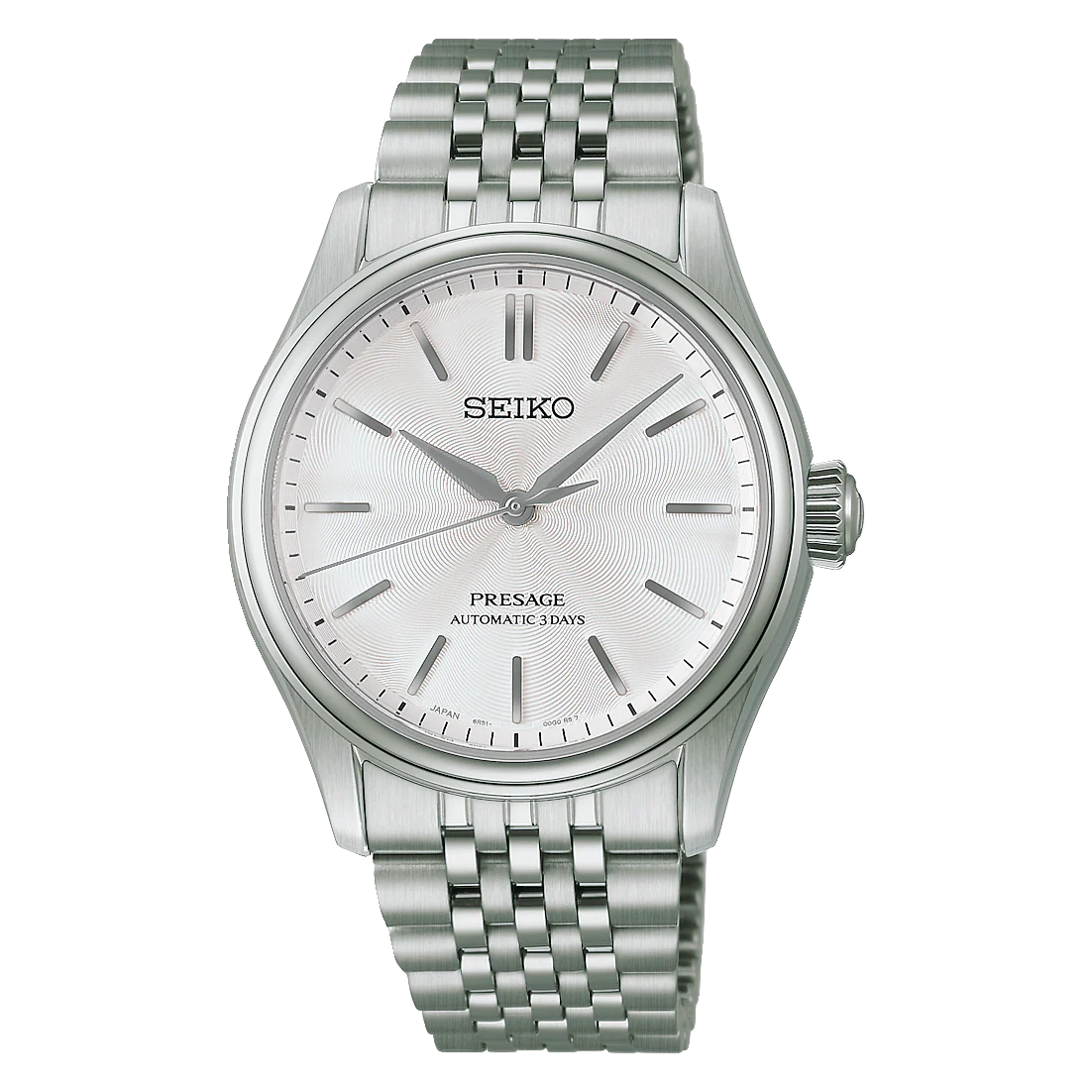
Many people have this notion that a dress watch only belongs in formal settings. They are usually hidden under the cuff of a fitted suit, saved for weddings, business meetings or other special events. However, that also begs the need for something a little more diverse with our modern lifestyles; something that fits just as well in the office as it does at weekend brunch or casual night outs.
Which is precisely what the Seiko Presage excels at.
Combining traditional Japanese design with reliable mechanical movement, Seiko proves that style and substance can, and often should coexist, especially in the Seiko Presage Classic Series. It is designed with elegant aesthetics, exceptional build-quality and daily wearability, making it an everyday watch.
Fit for Purposes Beyond Just Formal Wear
The Seiko Presage is all about having that balance. It has the elegance one would expect from a classic dress watch yet provides some much-needed durability for wear on a daily basis.
A broad range of details reflects Japan’s renowned dedication to craftsmanship and refined aesthetics. Each dial is distinguished by its own elegant colorway – Shironeri White, Wakatake-iro Green, and Sakura-iro Pink – paired with finely textured finishes that catch and reflect light beautifully. The result is a subtle interplay of color, depth, and sophistication, celebrating the timeless artistry that defines Japanese design.A broad range of details echo Japan’s enviable excellence at this competence. The dials are artistically inspired, taking cues from the texture of Tomioka silk to create micro-patters that shift elegantly as light travels across the dial. Add compact proportions and practical specifications, and they take you seamlessly from workday to weekend.
The Seiko Presage feels equally at home on your wrist, be it going to work, heading out for drinks with friends after a long week, or participating in some formal celebration.
Seiko Presage Classic Series – Packaged Elegant Daily Wear
For a mechanical watch with that tastefully dressed in casual style without being too dressy, it’s worth having a close up look at these Seiko Presage Classic Series models.
Pure Elegance: Seiko Presage Classic Series HCC001J1
The HCC001J1 embodies understated sophistication. The Pure White “Shironeri” dial, an embodiment of the beauty of traditional Tomioka silk in Japan, is enjoyed casually as well as matching well with business fashion. The styling here makes it a good versatile partner whether you are giving a talk at the conference room or unwinding over the weekend.
Inside, the watch is powered by Seiko’s reliable 6R51 automatic movement with manual winding capability. It achieves +25 to -15 seconds per day accuracy and provides around 72 hours of power reserve, allowing the watch to run through an entire weekend. With 24 jewels and a stop second hand feature for accurate time setting, it combines functionality with craftsmanship. The super hard coated 38mm stainless steel case and measures a comfortable 12.9mm thick that wears snugly. The gorgeously textured dial is protected by a dual-curved sapphire with anti-reflective coating. Rounding out its practical bona fides is a 10-bar water resistance rating and a transparent screw case back that displays the automatic movement inside.
A Fresh Take on Everyday Style: Seiko Presage Classic Series HCC002J1
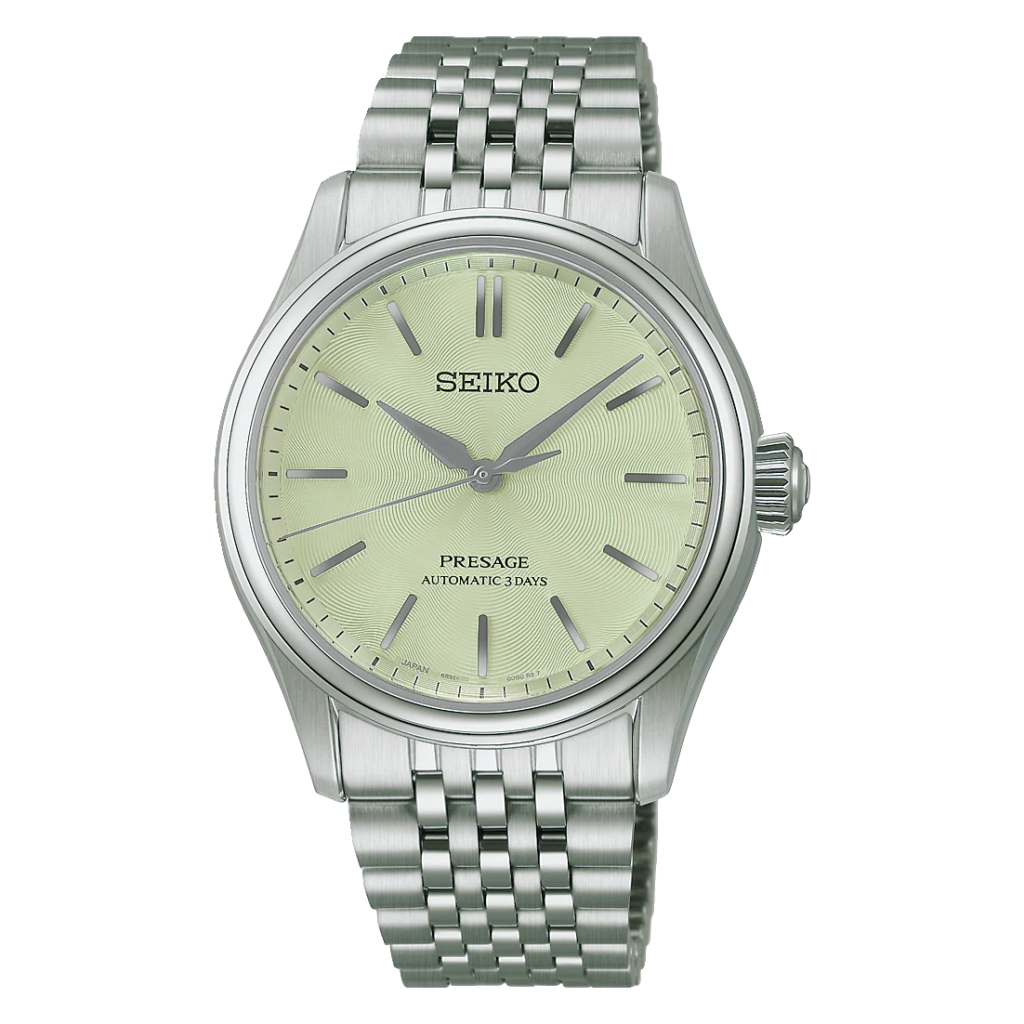
Need something different, but in an understated way? The HCC002J1 features a delightful “Wakatake-iro” dial: a fresh, vibrant green long favored in kimono dyeing. Provides a safe pop of color that compliments outfit, good for professional individuals who are looking to add character.
Sharing the same movement with its sibling, the HCC002J1 enjoys the reliable 6R51 automatic, manual-winding caliber that is good for +25 to -15 seconds a day accuracy, an impressive 72 hours of power reserve and 24 jewels. A stop second hand function ensures precision whenever synchronised. Encased in 38 mm of stainless steel finished with Seiko’s super hard coating, the timepiece remains a slim 12.9mm profile for for exceptional wearing comfort. A dual-curved sapphire crystal with anti-reflective inner coating protects the new silk-inspired green dial, and a deployment clasp with push-button release secures the bracelet against risk of loss throughout long days. An exhibition-style screw-in case back and 10-bar water resistance make it even more equipped for daily wear.
A Touch Of Elegance with Some Warmth: Seiko Presage Classic Series HCC003J1
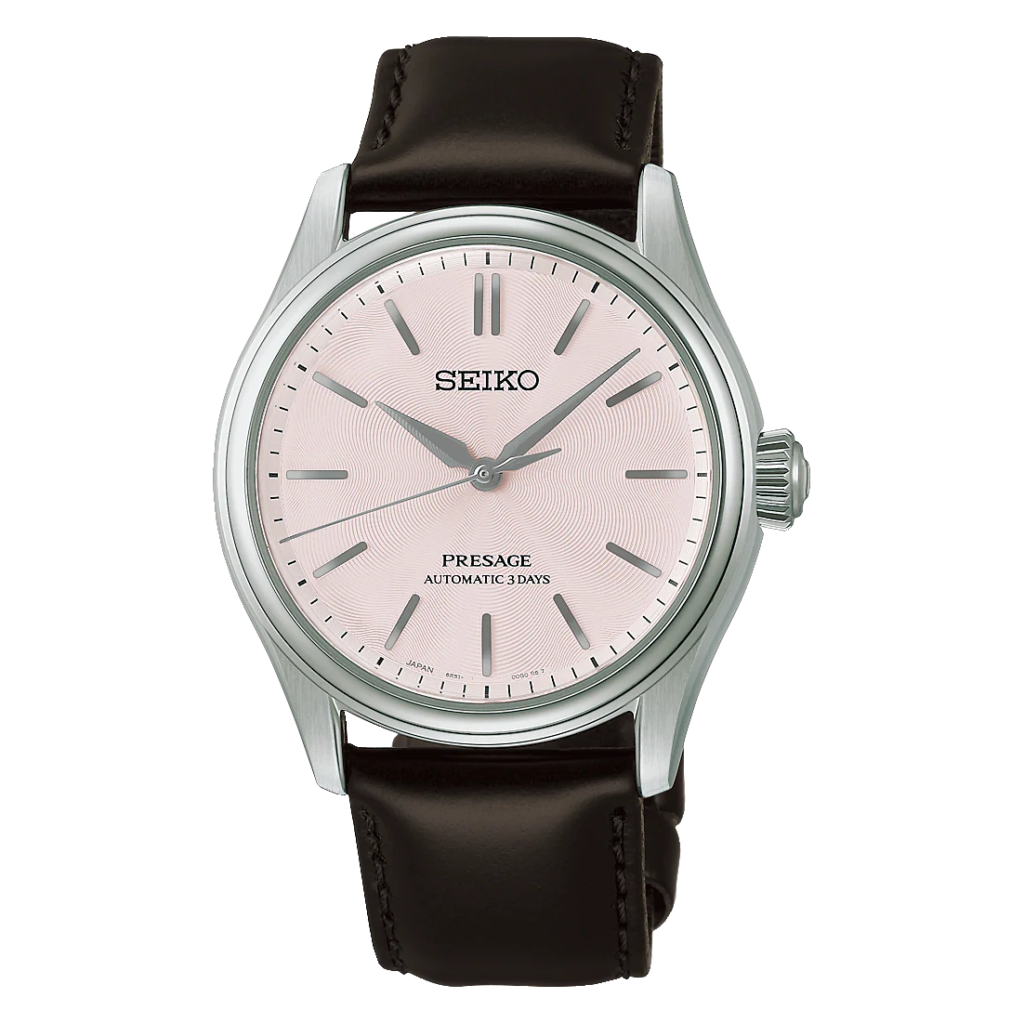
For the lovers of traditional elegance in a slightly gentler palette, the HCC003J1 uniquely features a stunning pink “Sakura-iro” (Cherry Blossom) dial inspired by one of Japan’s most recognizable natural sceneries. While maintaining a clean aesthetic for daily wear, it maintains a unique look with its warm, deeper tone.
The HCC003J1 is powered by Seiko’s proven 6R51 automatic, manual-winding movement with reliable +25 to -15 seconds per day accuracy backed up with roughly 72 hours of power reserve. Equipped with a stop second hand function for precise time-setting. The 38mm stainless steel case with a super hard coating stands at a reasonable thickness of 12.9mm and maintains the overall lug to lug measure of 43.8mm, while the dual-curved sapphire crystal with anti-reflective keeps it clear as day. Unlike the bracelet models, this version is paired with a premium cow leather strap secured by a three-fold clasp with push-button release, giving it a softer, more traditional feel on the wrist. Completing the package are 10-bar water resistance and a screw type case back with a glass insert to show off the sapphire and steel beauty of mechanical horology.
The Everyday Dress Watch You Will Never Take Off
The best watches don’t spend most of their lives inside a watch box. They’re worn, appreciated, and become part of your daily routine.
This is what makes the Seiko Presage so interesting. The blend of traditional Japanese craftsmanship, solid mechanical engineering and practical everyday durability, makes it clear that an automatic dress watch doesn’t have to be the exclusive domain of black-tie events.
The timeless elegance of the HCC001J1, the fluid grace of HCC002J1, or the warm sophistication of the HCC003J1, or some combination of these three, each can be worn from weekday to weekend and through special times as well.

Play-based learning sometimes gets dismissed by parents worried their child isn’t doing enough “real” academic work before kindergarten. The research tells a more nuanced story, one where structured play and academic readiness aren’t in tension at all.
What Play-Based Learning Actually Looks Like
The phrase can sound vague, but in a well-run classroom, play is intentional, not unstructured free time.
Every Material Has a Purpose
In a thoughtfully designed play-based classroom, blocks, art supplies, and dramatic play areas are placed with specific developmental goals in mind. A teacher sitting with a child in the block area asking “how many more blocks do you think you’ll need?” is delivering math instruction disguised as play. Asking a child to describe what they’re building is language development in action.
The Teacher’s Role Shifts
Rather than delivering instruction from the front of a room, teachers in play-based settings act as co-learners and facilitators, observing where a child’s interest leads and scaffolding learning from there. This model requires more skill from educators, not less, since it means reading each child’s development in real time rather than following a single fixed lesson plan.
What the Research Actually Shows
A 2022 cross-case study published in Early Childhood Education Journal followed children entering kindergarten after three or more years of play-based early education. Researchers described these children as strong learners, explorers, communicators, and empathizers, concluding that play-based learning prepared them for successful kindergarten transitions.
Academic and Social Gains Together
Longer-term comparisons cited in early childhood research literature found that children from play-based programs were more advanced in reading and math, better adjusted socially and emotionally, and stronger in creativity and oral expression compared with peers from more rigid, instruction-heavy programs.
Resiliency Under Pressure
A related study examining children’s coping during the pandemic-disrupted 2020-2021 school year found that kindergartners with a play-based early education background showed stronger adaptability, more sophisticated language for processing stressful situations, and greater persistence when circumstances changed unexpectedly.
Why Blended Approaches Work Best
The strongest case isn’t for play instead of academics, but for play alongside academics, woven together rather than treated as separate blocks of a school day.
- Time for exploration and discovery-based learning
- Structured moments for specific skill practice, like early literacy or number recognition
- A balance that respects how young children actually build understanding, through doing, not just listening
What This Means for Choosing a Program
Parents evaluating early education options in Pleasanton are often better served asking how a program integrates play with skill-building, rather than assuming these are opposing philosophies. A visit to Primrose School of Pleasanton or any local program worth considering should make that blend visible in the classroom itself, not just in a mission statement.
Kindergarten readiness isn’t only about knowing letters and numbers before day one. It’s about arriving with the social flexibility, communication skills, and curiosity that let a child actually benefit from formal instruction once it starts.
What Parents Can Do to Support Play-Based Learning at Home
The classroom isn’t the only place this kind of learning happens, and parents can reinforce the same approach outside of school hours.
Follow Their Lead
Rather than directing every activity, following a child’s own interest, letting them lead a pretend game or decide how to build with blocks, mirrors the same scaffolding approach used in a strong play-based classroom. Adults can still ask questions and introduce new vocabulary without taking over the activity entirely.
Narrate and Ask Open-Ended Questions
Simple narration during everyday moments, “you’re stacking those really carefully,” or open-ended questions, “what do you think will happen if we add another block?”, build the same language and reasoning skills a good preschool classroom targets during play.
Resist the Urge to Over-Structure Every Moment
Unstructured time matters too. Not every activity needs a lesson attached to it. Some of the most important learning happens when a child is simply left to explore an idea on their own terms, with an adult nearby to support rather than direct.
Talking to a Prospective School About Their Approach
When touring a program, it’s worth asking directly how teachers balance guided instruction with child-led exploration, and asking for a specific example rather than a general philosophy statement. A school that can describe a recent, concrete moment of this balance in action is usually one where the approach is genuinely embedded in daily practice, not just stated in marketing materials.


-

 Celebrity12 months ago
Carolin Bacic: Life, Biography, Family, and Legacy
-

 Celebrity5 months ago
Alex Eala: Rising Tennis Star from the Philippines and Her Journey to Global Success
-

 Celebrity1 year ago
Christine Williamson: A Rising Star in Sports Journalism
-

 Celebrity11 months ago
Dani Daniels: A Complete Biography of the Artist, Media Personality, and Entrepreneur
-

 Celebrity5 months ago
Valerie Perrine: A Complete Biography of the Acclaimed Actress and Icon
-

 Celebrity9 months ago
Eleonora Incardona: Biography, Career, Age, Boyfriend, Net Worth & Lifestyle (2025)
-

 Celebrity1 year ago
Vera Davich: Biography, Life, and Legacy2025
-

 Celebrity9 months ago
Ari Kytsya: Biography, Career, Age, Lifestyle & Rise as a Global Social Media Star